The store will not work correctly in the case when cookies are disabled.
We collect user information to provide a better user experience and protect the security of our website. By continuing to use our website, you acknowledge the use of cookies.
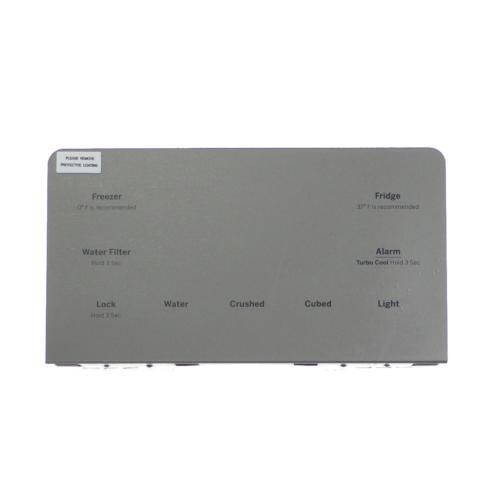
The General Electric WR55X30121 Control Display operates by receiving input from the user and transmitting instructions to control the cooling mechanism. It has a digital control panel that is easy to use shows the current temperature and allows the user to change the internal environment. Intended for durability, it works in conjunction with sensors to improve output and power consumption. It is made from stainless steel, making it to be strong and not easily corroded, can be used for long time. This control display enhance the performance of the appliance by providing visibility and control of functions, which leads to efficiency of the appliance.
Presents refrigerator settings and provides a user-facing electronic interface, the GENERAL ELECTRIC WR55X30121 Control Display Stainless Steel is a dedicated GE refrigerator display assembly that combines the visible control surface and display elements in one unit. Its stainless-steel finish provides the specified exterior appearance for refrigerator configurations designed around this assembly.
Control Interface Operation:
Electronic circuitry detects user selections and converts them into electrical signals recognized by the refrigerator's electronic control system. Display elements present related settings and status information, providing visual feedback for selected functions.
User-Facing Display Assembly:
The assembly brings the refrigerator's visible control surface and display elements together in one dedicated unit. Its stainless-steel finish forms part of the specified exterior appearance of refrigerator configurations designed around this assembly.
Replacement Guidelines:
Replacement of the GENERAL ELECTRIC WR55X30121 Control Display may be appropriate when the existing display or user interface no longer responds correctly or develops an electronic fault affecting its control functions. The replacement should correspond to the refrigerator's specific application and complete model information.
Common Failure Symptoms:
Display becoming blank or unresponsive.
Refrigerator settings failing to register through the interface.
Touch controls responding inconsistently.
Displayed refrigerator information appearing incorrectly or intermittently.
Multiple control functions becoming unavailable at the same time.
Equipment Compatibility:
The General Electric WR55X30121 Control Display Stainless Steel should be matched to the applicable GE refrigerator by verifying the complete refrigerator model number and part number WR55X30121 before purchase.
What maintenance is required for the General Electric WR55X30121 Control Display?
Keep the display clean and dry, regularly inspecting for loose connections or wear in wiring. Avoid moisture and power surges by using proper grounding and surge protection. Periodic checks ensure accurate operation and prevent signal or display malfunctions.
What are common issues with the General Electric WR55X30121 Control Display?
Screen flickering or blank display.
Unresponsive touch or button inputs.
Intermittent power or rebooting.
Corrupted or frozen interface.
Backlight failure or dim display.
Communication errors with control board.
What components are combined in the WR55X30121 Control Display?
The GENERAL ELECTRIC WR55X30121 combines the user-facing control surface and display elements in one refrigerator assembly.
What information can the WR55X30121 present during refrigerator operation?
The display portion presents information associated with refrigerator settings and operating status, providing visible feedback through the control interface.
How are user selections from the control display communicated to the refrigerator?
Electronic circuitry detects selections made through the control interface and converts them into electrical signals recognized by the refrigerator's electronic control system.
What part of the WR55X30121 provides its stainless-steel appearance?
The stainless-steel finish forms part of the specified exterior appearance of the control display assembly.
What can indicate a problem with the refrigerator control display?
A problem may be indicated when the display does not provide the expected information or the control interface does not properly register user selections.
Installation Steps
Step1: Unplug the appliance or switch off the circuit breaker for safety.
Step2: Remove the control panel cover using a screwdriver.
Step3: Disconnect the wiring harness from the old display.
Step4: Securely connect the new display’s wiring harness.
Step5: Mount the new display and reattach the panel cover.
Step6: Restore power and test functionality.
Step7: Avoid handling with wet hands and ensure all connections are firm.