
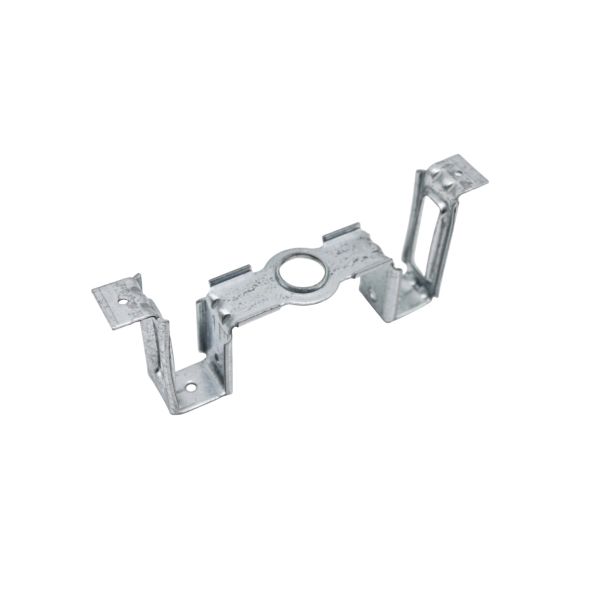
General Electric WR21X30013 Refrigerator Evaporator Fan Front Bracket

Special Price $7.50 Regular Price $8.29
In stock
Available Quantity:   33
SKU
WR21X30013

Product Description

EVAPORATOR FAN FRONT BRACKET
Evaporator, Fan,
Manufacturer
✓ This Product Replaces: WR02X10516
https://www.hnkparts.com/media/catalog/product/w/r/wr21x30013-77371.jpg

This Part Fits the Following Models (892)

GE XRS18GGAEBB Refrigerator GE GTZ18GCEDRSS Refrigerator GE GTZ18GCEERSS Refrigerator GE GTS17BCSALWW Refrigerator - S Series GE GTZ18GBEDRSS Refrigerator GE MTS17BBSELWW Refrigerator - S Series GE GTT17BBSBRCC Refrigerator - S Series GE GTT17BBSBRWW Refrigerator - S Series GE GTH17DBDFRBB Refrigerator GE GTH17DBDFRCC Refrigerator GE GTH17DBDFRWW Refrigerator GE GTH17GBB2RBB Refrigerator - B Series GE GTH17GBB2RWW Refrigerator - B Series GE GTH17DBDDRBB Refrigerator GE GTH17DBDDRCC Refrigerator
Showing 1-15 of 892
Manufacturer Name: GENERAL ELECTRIC
Product Number: WR21X30013
OEM Part Number: WR21X30013
Product Description: Evaporator Fan Front Bracket

Choose the best Home Appliance parts and supplies from HnKParts!

  • Same Day Shipping

  • Best Quality And Best Price

  • Wide Range of Inventory

  • Best Customer Service

Have More Questions or Need Help to Place The Order?
Reach us at (866)723-0907 or [email protected]

Write Your Own Review
You're reviewing:General Electric WR21X30013 Refrigerator Evaporator Fan Front Bracket
Your Rating
Customer Questions
No Questions

Installation Steps

Step 1: The refrigerator should be disconnected from the electrical source prior to starting this repair. Either it should be unplugged from the outlet or the power should be deactivated at the circuit breaker.

Step 2: The screws located at the top of the evaporator compartment cover should be taken off, and then the cover should be detached.

Step 3: The fan bracket situated just beneath the evaporator should be identified. Typically, it is secured by two (2) mounting screws.

Step 4: The screws fastening the fan bracket to the evaporator should be extracted.

Step 5: After the screws have been taken out, the old fan bracket can be removed, allowing for the installation of a new one.

Step 6: The new fan bracket should be fastened in position using the screws that were extracted in step 4.

Step 7: The evaporator compartment cover should be reattached, securing it with the screws that were taken out in step 2.

Step 8: The power should be restored and it should be verified that the fan bracket is functioning correctly.

Please note that these instructions serve as general guidance and should always be utilized alongside the manufacturer's manual, if accessible.
