The store will not work correctly in the case when cookies are disabled.
We collect user information to provide a better user experience and protect the security of our website. By continuing to use our website, you acknowledge the use of cookies.
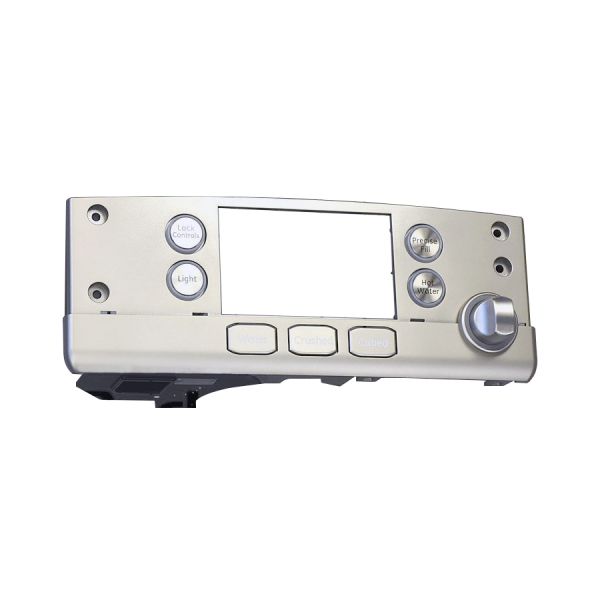
The General Electric WR17X27131 Display Assembly enables easy control of the fridge’s temperature and settings through a well-lit panel. The functionality of the control panel for efficient operation like temperature readings, mode selection, and error codes enables the users to manage the system simply. Assembly links with the electronic system to facilitate communication and operate with accuracy. Improves convenience, preserving the quality of food, and increasing the durability of the appliance.
Provides the display interface for the refrigerator's single-serve KCup feature. The GENERAL ELECTRIC WR17X27131 Refrigerator KCup Display Assembly forms part of the refrigerator's user-facing single-serve system and presents the display information associated with this feature. GE identifies this part as a stainless-steel single-serve display assembly.
Display Interface:
Provides the visible display interface associated with the refrigerator's single-serve feature. The assembly supports presentation of applicable information through its integrated display surface, allowing the refrigerator's KCup system to provide the corresponding user-facing information.
Single-Serve Integration:
Forms part of the refrigerator's integrated single-serve KCup system. The display assembly works with the associated single-serve components to provide the user-facing display function required by the applicable refrigerator configuration.
Replacement Guidelines:
Replacing the Refrigerator KCup Display Assembly is appropriate if it is damaged, malfunctioning, excessively worn, or otherwise deteriorated. Verify the GENERAL ELECTRIC part number WR17X27131 and the complete refrigerator model number before replacement. Replace the display assembly if deterioration affects display operation, visible information, single-serve interface function, or normal refrigerator operation.
Common Failure Symptoms:
KCup display failing to illuminate or respond.
Display information becoming difficult to see.
Display operation becoming intermittent.
Single-serve display becoming unresponsive.
Visible cracks or physical damage.
Display surface becoming damaged or deteriorated.
Equipment Compatibility:
The GENERAL ELECTRIC Refrigerator KCup Display Assembly is intended for equipment that specifies part number WR17X27131. Verify the complete refrigerator model number and manufacturer's parts documentation before purchasing to help confirm the correct application. GE and parts references identify the assembly for applicable GE refrigerator configurations.
What maintenance is required for the General Electric WR17X27131 Display Assembly?
Clean the display interface regularly to remove residue that may affect touch sensitivity. Verify menu selections respond accurately during use. Check indicator lights for proper function and confirm beverage preparation settings activate correctly when selected from the control interface.
What are common issues with the General Electric WR17X27131 Display Assembly?
Display is not responding to selections.
Interface freezing during operation.
Settings not updating properly.
Commands are delayed after input.
What is the GE WR17X27131 used for?
It provides the display interface for the refrigerator's single-serve KCup feature.
What does the WR17X27131 display assembly support?
It supports the user-facing display function associated with the refrigerator's single-serve system.
How can the WR17X27131 affect the KCup feature?
A deteriorated display assembly can affect display visibility, interface response, or normal single-serve operation.
What are the signs that the WR17X27131 needs replacement?
An unresponsive display, intermittent operation, poor display visibility, or visible physical damage can indicate deterioration.
Is the WR17X27131 a refrigerator display assembly?
Yes. It is a single-serve KCup display assembly designed for applicable GE refrigerator configurations.
Installation Steps
Step1: Unplug the refrigerator before starting work.
Step2: Remove the control panel cover to access the display.
Step3: Disconnect the wiring harness from the old display assembly.
Step4: Unscrew and remove the defective display.
Step5: Mount the new display and reconnect wires.
Step6: Reattach the panel, plug in, and test functionality.