The store will not work correctly in the case when cookies are disabled.
We collect user information to provide a better user experience and protect the security of our website. By continuing to use our website, you acknowledge the use of cookies.
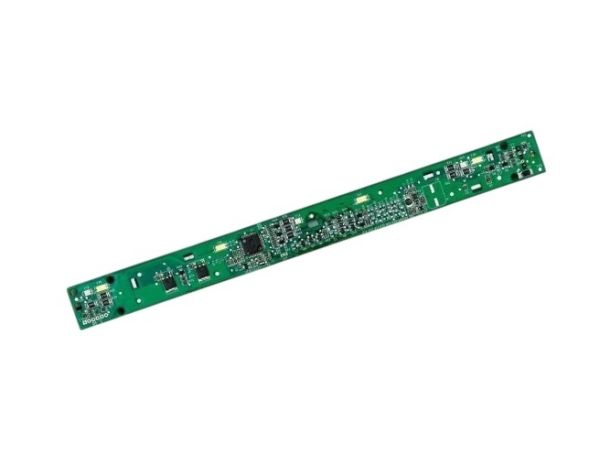
The General Electric WR17X23042 Refrigerator Deli Drawer PCB with Overlay is an electronic control board that manages the temperature and user interface features of the freezer compartment. Its function is to take the input of the overlay controls, and sensors and manipulate cooling components to keep the desired temperature of the deli items. The PCB works based on the interpretation of user commands and sensor feedback, and the overlay provides touchpoints that are easy to access. It is positioned in the deli drawer compartment behind the control surface and connected to the wiring harness.
Controls designated deli-drawer functions, the GENERAL ELECTRIC WR17X23042 Deli Drawer PCB W/ Overlay is an electronic control assembly used in specified GE refrigerators. It combines a printed circuit board with a user-facing overlay to support the deli drawer's available control functions, including settings associated with temperature and humidity.
User Input Signal Processing:
User selections made through the overlay generate electronic inputs that are received by the PCB's control circuitry. The circuitry processes these inputs and produces the corresponding electrical responses for the functions assigned to the deli drawer control system.
Deli Drawer Control:
The PCB supports electronic control of the deli drawer's designated operating functions according to the selected settings. Its control activity allows the refrigerator's deli drawer system to respond to available temperature and humidity selections.
Replacement Guidelines:
Replacement may be appropriate when the GENERAL ELECTRIC WR17X23042 Deli Drawer PCB W/ Overlay is damaged or no longer provides its intended control functions. Replacement may also be appropriate when user selections through the deli drawer interface no longer produce the expected control response.
Common Failure Symptoms:
Deli drawer temperature settings do not respond to user inputs.
Control buttons or touch points do not respond consistently.
The deli drawer display does not illuminate or display information properly.
Selected deli drawer settings do not appear to register.
Deli drawer control functions become intermittent or unavailable.
Equipment Compatibility:
The GENERAL ELECTRIC WR17X23042 Deli Drawer PCB W/ Overlay should be matched to the applicable GE refrigerator by verifying the complete refrigerator model number and part number WR17X23042 before purchase.
What maintenance is required for the General Electric WR17X23042 PCB With Overlay?
Keep the overlay clean using a soft, dry cloth to maintain clear visibility and responsiveness. Protect the PCB from moisture and spills. Ensure wiring connections remain secure. Periodically monitor drawer functions to confirm accurate temperature control and proper electronic performance.
What are common issues with the General Electric WR17X23042 PCB With Overlay?
Temperature settings not responding.
Display failing to illuminate.
Communication errors with main board.
Drawer controls not activating.
How does a user interact with the deli drawer through the control surface?
The overlay provides the visible and user-facing area for making deli drawer selections, while the PCB processes those inputs for the associated control system.
Why can the available deli drawer settings vary between refrigerator models?
The control functions supported by the WR17X23042 depend on the refrigerator model in which the assembly is installed.
Is the WR17X23042 a main refrigerator control board?
No. It is a dedicated deli drawer control assembly rather than the refrigerator's main electronic control board.
What happens if the deli drawer control interface is not working correctly?
User selections may not be communicated normally to the electronic control system, affecting the operation of the associated deli drawer controls.
Why are the PCB and overlay supplied as one assembly?
The PCB provides the electronic circuitry while the overlay provides the user-facing control surface, allowing both parts to work together as the deli drawer control interface.
Installation Steps
Step1: Unplug the refrigerator to avoid electrical risk.
Step2: Remove the deli drawer and access the control housing area.
Step3: Disconnect wiring connectors from the existing PCB carefully.
Step4: Unscrew and remove faulty board with the overlay attached.
Step5: Install the new PCB and reconnect all wiring securely.
Step6: Reassemble the drawer and restore power to verify functionality.