
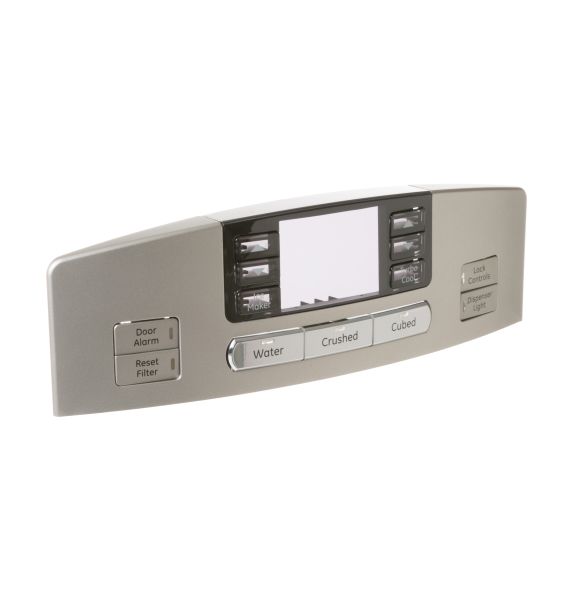
General Electric WR17X13200 Refrigerator Display Assembly

Special Price $136.71 Regular Price $157.95
In stock
Available Quantity:   70
SKU
WR17X13200

Product Description

General Electric WR17X13200 Refrigerator Display Assembly is an effective way of managing a refrigerator and its settings. This component include a touch screen that allows the user to control the temperature, other features of the system for optimal performance. The assembly functions in such a way that it receives signals from the sensors within the refrigerator and gives back clear and understandable information to the users. Some of the benefits include increased convenience, better control, and the general usefulness of the refrigerator.
Manufacturer

https://www.hnkparts.com/media/catalog/product/w/r/wr17x13200_general-electric_hnkparts.png
Manufacturer Name: GENERAL ELECTRIC
Product Number: WR17X13200
OEM Part Number: WR17X13200
Product Description: Display Asm

Choose the best Home Appliance parts and supplies from HnKParts!

  • Same Day Shipping

  • Best Quality And Best Price

  • Wide Range of Inventory

  • Best Customer Service

Have More Questions or Need Help to Place The Order?
Reach us at (866)723-0907 or [email protected]

Write Your Own Review
You're reviewing:General Electric WR17X13200 Refrigerator Display Assembly
Your Rating
Customer Questions
What maintenance is required for the General Electric WR17X13200 Display Assembly?

Regularly clean the display with a soft, dry cloth to prevent dust buildup and smudges. Inspect for loose connectors or worn wiring. Always disconnect power before maintenance. Avoid liquids to prevent short circuits or permanent damage.

What are common issues with the General Electric WR17X13200 Display Assembly?

  • Cooling system cycles erratically.
  • Temperature display shows incorrect readings.
  • Defrost cycle fails to activate.
  • Stops responding to the control inputs.

Installation Steps

Step1: Unplug the refrigerator to ensure safety.

Step2: Remove the control panel or access cover to expose the display assembly.

Step3: Disconnect all wiring harnesses from the old display assembly.

Step4: Unscrew and carefully remove the old display assembly.

Step5: Install the new display assembly and secure with screws.

Step6: Reconnect all wiring as originally positioned.

Step7: Replace the access panel, restore power, and verify the display functions correctly.