
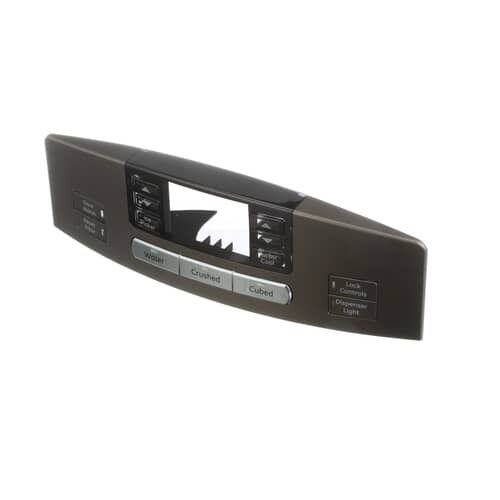
General Electric WR17X13155 Refrigerator Display Assembly (ICID) ES

Special Price $139.15 Regular Price $159.95
In stock
Available Quantity:   52
SKU
WR17X13155

Product Description

The General Electric WR17X13155 Refrigerator Display Assembly (ICID) ES provides clear temperature readings and control functions for efficient cooling management. It processes input signals to regulate temperature settings and relay operational data to the refrigerator system. The display interacts with internal sensors, ensuring precise adjustments and smooth performance. This assembly enhances usability by offering real-time status updates while promoting energy efficiency. Reliable operation and easy monitoring contribute to prolonged appliance performance and optimized cooling efficiency.
Manufacturer

https://www.hnkparts.com/media/catalog/product/w/r/wr17x13155-98404.jpg

This Part Fits the Following Models (1)

Manufacturer Name: GENERAL ELECTRIC
Product Number: WR17X13155
OEM Part Number: WR17X13155
Product Description: Display Asm (Icid) Es

Choose the best Home Appliance parts and supplies from HnKParts!

  • Same Day Shipping

  • Best Quality And Best Price

  • Wide Range of Inventory

  • Best Customer Service

Have More Questions or Need Help to Place The Order?
Reach us at (866)723-0907 or [email protected]

Write Your Own Review
You're reviewing:General Electric WR17X13155 Refrigerator Display Assembly (ICID) ES
Your Rating
Customer Questions
What maintenance is required for the General Electric WR17X13155 Display Assembly?

Inspect the display for proper alignment and ensure buttons and icons respond correctly. Clean gently with a soft cloth, avoiding moisture ingress. Check electrical connectors for secure attachment and confirm the interface communicates accurately with the refrigerator control system.

What are common issues with the General Electric WR17X13155 Display Assembly?

  • Display not powering on.
  • Icons not updating correctly.
  • Touch input registering incorrectly.
  • Temperature settings not reflecting changes.

Installation Steps

Step1: Unplug the refrigerator from the power source.

Step2: Access the display housing on the door and remove securing screws.

Step3: Disconnect the wire harness from the old display assembly.

Step4: Position the new display and reconnect all wiring.

Step5: Secure it with screws and reattach the cover.

Step6: Restore power and verify the display functions correctly.