The store will not work correctly in the case when cookies are disabled.
We collect user information to provide a better user experience and protect the security of our website. By continuing to use our website, you acknowledge the use of cookies.
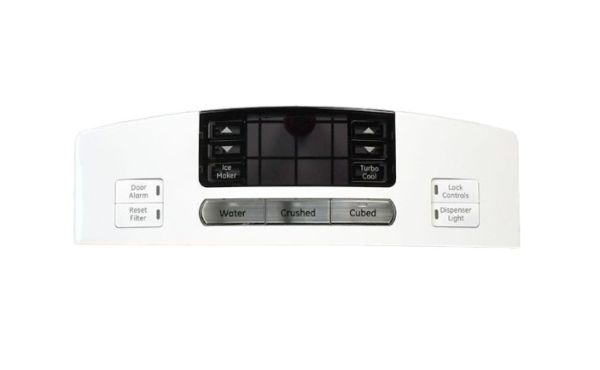
General Electric WR17X13143 Display Assembly ICID is useful in the management of the display and electronic controls in the refrigerator. It operate by controlling the information displayed on the refrigerator’s temperature and settings so that the correct information is provided to the user. This assembly ensures that the refrigerator is functioning properly and does not have problems with the display or non-responsive buttons. It also makes working with the appliance easy, without interruptions, which makes it even more suitable, because it will effectively work for a long time without any issues.
Presents refrigerator information and supports available user selections, the General Electric WR17X13143 Refrigerator Display Board Assembly ICID is a display board assembly used in specified GE refrigerators. It forms part of the front-facing electronic interface and combines the display with associated control-input functions within one assembly.
Display Signal Processing:
Electronic circuitry handles the electrical information associated with display output and available interface inputs. Display-related signals are processed for presentation through the display elements, while interface circuitry recognizes electrical changes generated by available controls. This allows the board to manage display and control-input signals as part of the refrigerator's electronic interface.
User Interface Control:
Available user selections are incorporated into the front-facing interface alongside the display. The assembly presents applicable temperature, setting, and control information while allowing users to interact with designated refrigerator functions through the available controls. This combines information display and user input within the same interface assembly.
Replacement Guidelines:
Replacement may be appropriate when the WR17X13143 is damaged or no longer performs its intended display or interface function. A correctly specified replacement restores the display assembly required by the applicable refrigerator.
Common Failure Symptoms:
Display becoming blank
Display information becoming incomplete or difficult to read
Display flickering or operating intermittently
Refrigerator control selections failing to respond normally
Certain interface or dispenser selections becoming unavailable
Equipment Compatibility:
The General Electric WR17X13143 Refrigerator Display Board Assembly ICID should be matched to the applicable GE refrigerator by verifying the complete refrigerator model number and part number WR17X13143 before purchase.
What maintenance is required for the General Electric WR17X13143 Display Board Assembly?
Wipe the board surface to remove moisture and residue. Ensure all connectors are securely seated. Test multiple functions to confirm accurate display feedback. Monitor operation across settings to maintain consistent performance and proper communication with components.
What are common issues with the General Electric WR17X13143 Display Board Assembly?
Display showing incorrect readings.
Random cycles or alerts triggering.
Delayed or inconsistent updates.
Indicators failing to illuminate properly.
What information can the WR17X13143 display?
It can present applicable temperature, setting, and refrigerator-status information according to the model’s display configuration.
Why might a display show information but not respond to a selection?
Display output and control inputs can involve different portions of the assembly, so an issue affecting one input may leave other display functions operating.
What can a user do through the front-facing display interface?
The interface allows users to view available information and enter designated selections.
Can an interface problem affect only certain functions?
Yes. Different display elements and control inputs can use separate electrical paths, allowing a problem in one area to affect specific functions rather than the entire assembly.
Why does the display assembly communicate with the refrigerator's control system?
It receives information for display and passes available user selections to the refrigerator's broader electronic control system.
Installation Steps
Step1: Unplug the refrigerator to prevent electrical hazards.
Step2: Remove the control panel screws and carefully detach the panel.
Step3: Disconnect all wiring harnesses from the old display board.
Step4: Position the new display board and reconnect wires securely.
Step5: Reattach the control panel and tighten screws.
Step6: Restore power and verify the display operates correctly.