
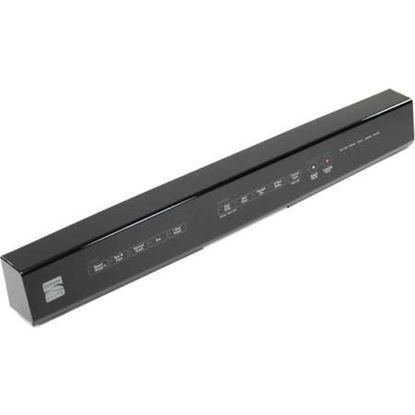
Whirlpool WPW10500167 Dishwasher Console

Special Price $178.41 Regular Price $225.34
Out of stock
Available Quantity:   0
SKU
WPW10500167
✓ This Product Replaces: W10335626, W10493381, W10500167

Product Description

The Whirlpool WPW10500167 Dishwasher Console is the core control panel for compatible Whirlpool dishwashers, giving consumers easy access to different cleaning choices and settings. This console is mounted on the dishwasher door and lets customers choose from a variety of wash cycles, change the temperature, and keep an eye on the cleaning progress on its digital display. The ergonomic design and user-friendly interface of the WPW10500167 improve the overall efficiency and convenience of dishwashing activities. Long-term dependability is ensured by its durable design, which withstands the rigors of regular operation. With this console, dishwashing is made easier and more flexible for users, all while getting the best possible cleaning outcomes. This Whirlpool WPW10500167 Dishwasher Console makes cleaning difficult stains and breakable dishes easier by streamlining the procedure.

Console,
Manufacturer
Manufacturer Name: WHIRLPOOL
Product Number: WPW10500167
OEM Part Number: WPW10500167
Product Description: Console

Choose the best Home Appliance parts and supplies from HnKParts!

  • Same Day Shipping

  • Best Quality And Best Price

  • Wide Range of Inventory

  • Best Customer Service

Have More Questions or Need Help to Place The Order?
Reach us at (866)723-0907 or [email protected]

Write Your Own Review
You're reviewing:Whirlpool WPW10500167 Dishwasher Console
Your Rating
Customer Questions
What maintenance is required for the Whirlpool WPW10500167 Console?

Wipe the dishwasher console regularly with a soft, damp cloth to remove spills and fingerprints. Avoid harsh chemicals that can damage buttons or displays. Check for loose buttons or broken panels and address promptly. Keeping it clean ensures accurate control and safe operation.

What are common issues with the Whirlpool WPW10500167 Console?

  • Buttons not responding or sticking.
  • Display screen malfunctioning or flickering.
  • Error codes appearing incorrectly.
  • Loose or broken control panel components.

Installation Steps

Step1: Disconnect power to the dishwasher at the circuit breaker for safety.

Step2: Open the dishwasher door and remove the screws securing the inner door panel.

Step3: Carefully separate the panel to access the console assembly.

Step4: Disconnect the wire harnesses from the old console and remove any mounting screws.

Step5: Position the new console, secure it with the original hardware, and reconnect all wiring.

Step6: Reassemble the door panel, restore power, and test the control functions to verify proper operation.