
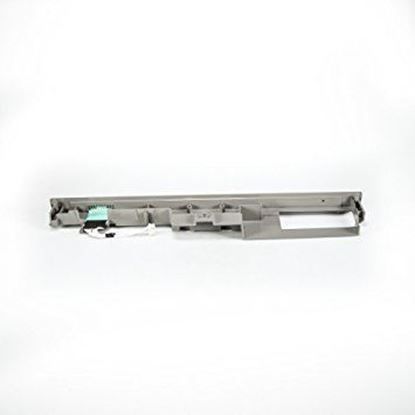
Whirlpool WPW10475777 Dishwasher Control Panel

Special Price $121.56 Regular Price $147.95
In stock
Available Quantity:   14
SKU
WPW10475777

Product Description

The Whirlpool WPW10475777 is your dishwasher's control panel, which coordinates the entire wash cycle. The control panel turns your commands into actions when you choose a wash cycle and hit start. It directs the water valves, drain pump, and other dishwasher parts to carry out particular functions by sending them electronic signals.The control panel monitors the water pressure and temperature as well as other internal dishwasher sensors during the wash cycle. It has the ability to change settings to maximize performance if it finds any problems. swapping out the old control panel for the Whirlpool one. WPW10475777 restores complete functionality to your dishwasher, ensuring optimal cleaning performance.


Manufacturer

✓ This Product Replaces: W10475777
https://www.hnkparts.com/media/catalog/product/w/p/wpw10475777_whirlpool_hnkparts.jpg
Manufacturer Name: WHIRLPOOL
Product Number: WPW10475777
OEM Part Number: WPW10475777
Product Description: Panel-Cntl

Choose the best Home Appliance parts and supplies from HnKParts!

  • Same Day Shipping

  • Best Quality And Best Price

  • Wide Range of Inventory

  • Best Customer Service

Have More Questions or Need Help to Place The Order?
Reach us at (866)723-0907 or [email protected]

Write Your Own Review
You're reviewing:Whirlpool WPW10475777 Dishwasher Control Panel
Your Rating
Customer Questions
What maintenance is required for the Whirlpool WPW10475777 Control Panel?

Maintain the dishwasher control panel by keeping it clean and dry, wiping gently with a soft cloth. Avoid harsh chemicals to prevent damage to buttons or display. Regularly check for moisture buildup or loose connections. Ensure power is off before inspection for safety.

What are common issues with the Whirlpool WPW10475777 Control Panel?

  • Unresponsive or stuck buttons.
  • Display not lighting up or showing incorrect information.
  • Intermittent operation or failure to start cycles.
  • Error codes appearing due to dishwasher control board malfunctions.

Installation Steps

Step1: Disconnect dishwasher power supply at breaker for safety.

Step2: Remove inner door panel screws carefully.

Step3: Detach old control panel and disconnect harness connectors.

Step4: Connect new control panel wiring securely ensuring proper alignment.

Step5: Reassemble and test cycle with power restored.