
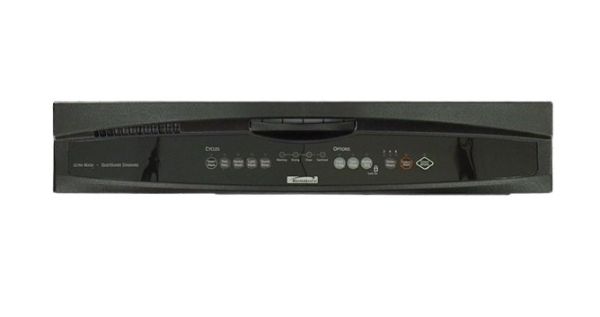
Whirlpool WPW10459133 Dishwasher Control Panel

Special Price $160.91 Regular Price $288.46
In stock
Available Quantity:   5
SKU
WPW10459133

Product Description

The Whirlpool WPW10459133 is a replacement control panel that is specifically intended for Whirlpool dishwashers. This houses all of the buttons and displays that allow you to interact with your dishwasher. When you press a button on the control panel, an electronic signal is sent to the dishwasher's internal control board, which instructs the dishwasher to perform a certain job, such as starting a wash cycle or adjusting the water temperature. A faulty control panel can cause a range of problems with your dishwasher, including unresponsive buttons, a malfunctioning display, and cycles that do not run properly.  Replacing a broken control panel with the WPW10459133 can restore your dishwasher's full operation and ensure you can continue using it to clean your dishes conveniently.

Manufacturer
✓ This Product Replaces: W10459133
https://www.hnkparts.com/media/catalog/product/w/p/wpw10459133-22624.jpg
Manufacturer Name: WHIRLPOOL
Product Number: WPW10459133
OEM Part Number: WPW10459133
Product Description: Panel-Cntl

Choose the best Home Appliance parts and supplies from HnKParts!

  • Same Day Shipping

  • Best Quality And Best Price

  • Wide Range of Inventory

  • Best Customer Service

Have More Questions or Need Help to Place The Order?
Reach us at (866)723-0907 or [email protected]

Write Your Own Review
You're reviewing:Whirlpool WPW10459133 Dishwasher Control Panel
Your Rating
Customer Questions
What maintenance is required for the Whirlpool WPW10459133 Control Panel?

Keep the control panel clean by wiping it with a soft, damp cloth to remove grease and residue. Avoid chemicals that may damage the surface. Ensure the dishwasher is powered off before cleaning to prevent electrical hazards. Regular inspection maintain responsiveness and proper operation.

What are common issues with the Whirlpool WPW10459133 Control Panel?

  • Unresponsive or non-functioning buttons.
  • Display not lighting up or flickering.
  • Incorrect cycle selection or failure to start.
  • Intermittent operation due to loose connections.
  • Control panel not communicating with the main control board.

Installation Steps

Step1: Turn off the dishwasher power at the circuit breaker to avoid electric shock.

Step2: Open the dishwasher door and remove screws securing the inner panel.

Step3: Carefully separate the control panel from the door assembly.

Step4: Disconnect wiring harnesses gently from the old panel.

Step5: Connect wires to the new control panel securely.

Step6: Reattach the panel and tighten screws firmly.

Step7: Restore power and test functionality before regular use.