
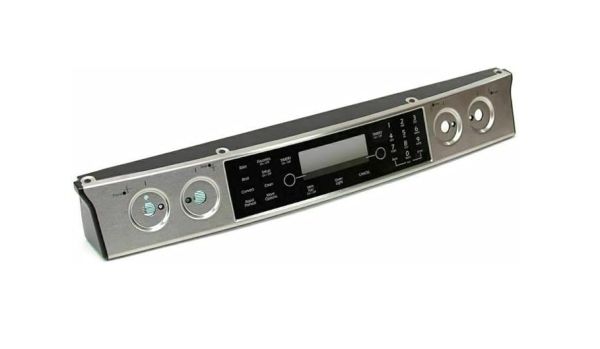
Whirlpool WPW10206071 Range Control Panel

Special Price $270.80 Regular Price $351.80
In stock
Available Quantity:   4
SKU
WPW10206071

Product Description

The Whirlpool WPW10206071 Range Control Panel is an essential component of Whirlpool ranges, acting as the primary interface for regulating numerous culinary tasks. Users may easily and precisely modify culinary settings like temperature, duration, and cooking mode with this elegant and user-friendly panel. It is installed prominently on the range and offers a user-friendly experience that improves the convenience and efficiency of meal preparation. The control panel's long-term durability and dependability are guaranteed by its construction to endure the heat and demands of cooking. Users may effortlessly navigate through cooking settings and optimize their culinary experience to the device's clear display and quick touch buttons. 

Manufacturer

✓ This Product Replaces: 74011866, W10206071
https://www.hnkparts.com/media/catalog/product/w/p/wpw10206071-59178.jpg

This Part Fits the Following Models (2)

Manufacturer Name: WHIRLPOOL
Product Number: WPW10206071
OEM Part Number: WPW10206071
Product Description: Panl-Cntrl

Choose the best Home Appliance parts and supplies from HnKParts!

  • Same Day Shipping

  • Best Quality And Best Price

  • Wide Range of Inventory

  • Best Customer Service

Have More Questions or Need Help to Place The Order?
Reach us at (866)723-0907 or [email protected]

Write Your Own Review
You're reviewing:Whirlpool WPW10206071 Range Control Panel
Your Rating
Customer Questions
What maintenance is required for the Whirlpool WPW10206071 Control Panel?

Clean the range control panel regularly using a soft, damp cloth to remove grease and spills. Avoid harsh chemicals or abrasive materials that can damage buttons and the display. Ensure the panel is dry before use to avoid electrical issues.

What are common issues with the Whirlpool WPW10206071 Control Panel?

  • Unresponsive or sticky buttons.
  • Display malfunctions or fading.
  • Erratic temperature or timer readings.
  • Power or connection failures affecting stove operation.

Installation Steps

Step1: Turn off power range at the breaker to avoid electric shock.

Step2: Remove mounting screws securing the old control panel.

Step3: Gently disconnect wire harnesses from the panel.

Step4: Connect wires to the new control panel correctly.

Step5: Align and secure the new panel with screws.

Step6: Restore power and test all controls for proper operation.