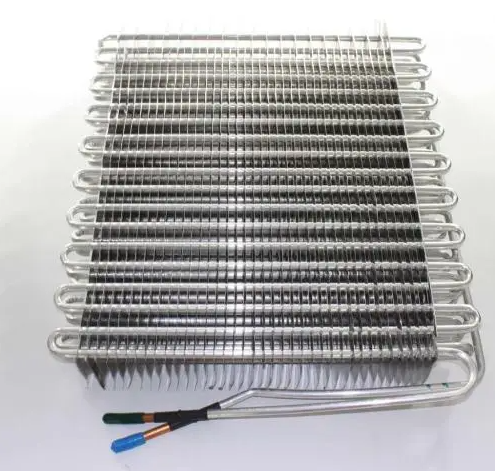
The Whirlpool WPW10205102 Refrigerator Evaporator is used to circulate the refrigerant around the internal coils to absorb the heat and keep the temperatures low. It removes heat energy inside the fridge to the refrigeration system to maintain stable cooling. This replacement evaporator is installed behind the rear panel of the freezer compartment.
Step 1: Find and Disconnect the Evaporator Fan Motor.
Prior to commencing any tasks on your Whirlpool WPW10205102, the appliance should be disconnected from the electrical outlet to avert the risk of electric shock. A screwdriver should be utilized to extract the screws from the rear panel, then the panel should be detached from the refrigerator. It should be noted which screws were utilized and it should be ensured they are stored safely throughout the repair.
Step 2: Take Out the Old Motor.
The evaporator fan motor should be identified and the electrical connector should be detached by gently pulling it off the pins. If difficulty is encountered in unplugging the connector, a pair of needle-nose pliers should be considered for employment. After the electrical connector is detached, the mounting screws securing the evaporator fan motor should be removed. The old motor should be carefully extracted and set aside.
Step 3: Position the New Motor.
The new evaporator fan motor should be taken and the electrical connector should be attached to the pins previously used for the old motor. Once it is connected, the mounting screws should be used to fasten the motor to the refrigerator frame. It should be ensured the screws are tightened to minimize vibrations during operation.
Step 4: Reinstall the Back Panel.
The back panel should be reinstalled onto the refrigerator utilizing the same screws that were initially employed. It should be verified that all screws are tightly secured before the Whirlpool WPW10205102 is reconnected to the electrical outlet.
Step 5: Verify the Evaporator Fan.
The evaporator fan motor should be carefully checked by adjusting the temperature control to its lowest setting. A soft whirring sound that signifies the fan is functioning correctly should be listened for. If the fan does not operate, the electrical connector and mounting screws should be reexamined to confirm they are properly connected.
Please be aware that these instructions serve as general guidance and should always be utilized alongside the manufacturer’s manual, if available.