
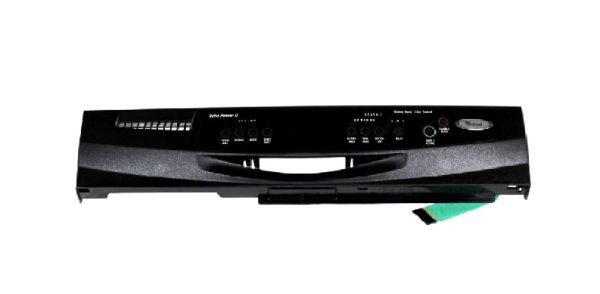
Whirlpool WPW10142945 Dishwasher Control Panel

Special Price $242.08 Regular Price $301.62
In stock
Available Quantity:   6
SKU
WPW10142945
✓ This Product Replaces: 3385737, W10142945

Product Description

The Whirlpool WPW10142945 Dishwasher Control Panel is responsible for relaying the selected settings to the control board to enable proper functioning. The buttons on the panel are designed to make it easy to select the cycle and the product is made to be durable. With built-in controls that make water usage and energy application easier, its efficiency is realized. This replacement part is used to repair control problems in dishwashers and enhances the durability of the appliances.
Manufacturer

https://www.hnkparts.com/media/catalog/product/w/p/wpw10142945-74778.jpg
Manufacturer Name: WHIRLPOOL
Product Number: WPW10142945
OEM Part Number: WPW10142945
Product Description: Panel-Cntl

Choose the best Home Appliance parts and supplies from HnKParts!

  • Same Day Shipping

  • Best Quality And Best Price

  • Wide Range of Inventory

  • Best Customer Service

Have More Questions or Need Help to Place The Order?
Reach us at (866)723-0907 or [email protected]

Write Your Own Review
You're reviewing:Whirlpool WPW10142945 Dishwasher Control Panel
Your Rating
Customer Questions
What maintenance is required for the Whirlpool WPW10142945 Control Panel?

Regularly wipe the dishwasher control panel with a soft, damp cloth to remove food residue and grease. Avoid chemicals to prevent damage. Ensure buttons remain operational, check for loose connections, and keep the area dry to prevent electrical issues.

What are common issues with the Whirlpool WPW10142945 Control Panel?

  • Unresponsive or sticking buttons.
  • Display malfunctions or dim screens.
  • Error codes due to faulty controls.
  • Intermittent operation or failure to start cycles.

Installation Steps

Step1: Disconnect power at breaker and ensure dishwasher is off and door open safely.

Step2: Remove inner door panel screws and carefully detach old control panel noting wire connections.

Step3: Disconnect wiring harness by pressing release tabs and remove faulty panel.

Step4: Align new control panel, reconnect harness firmly, and secure mounting screws.

Step5: Reassemble door panel, restore power, and test all cycle buttons for proper operation.