
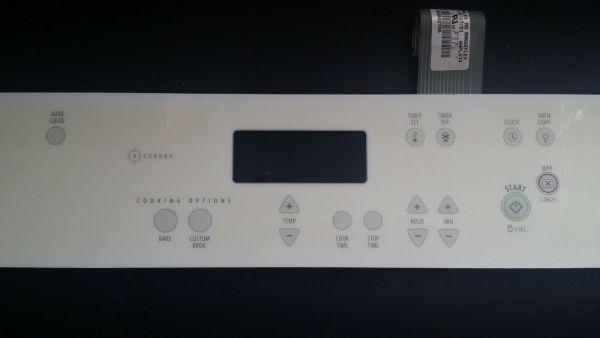
Whirlpool WP8304270 Range Membrane Switch Touch Pad

Special Price $180.88 Regular Price $315.80
In stock
Available Quantity:   1
SKU
WP8304270

Product Description

The Whirlpool WP8304270 Range Membrane Switch Touch Pad is fitted on the control panel of kitchens to activate and control cooking processes using a touch-sensitive control. It is the main input system for choosing oven temperatures, cooking modes and timers. A membrane switch works by measuring pressure when certain parts of the flat, flexible keypad are touched, passing information to the control board of the oven.
Manufacturer

✓ This Product Replaces: 8304270
https://www.hnkparts.com/media/catalog/product/w/p/wp8304270_whirlpool_hnkparts.png

This Part Fits the Following Models (1)

Manufacturer Name: WHIRLPOOL
Product Number: WP8304270
OEM Part Number: WP8304270
Product Description: Swtch-Memb

Choose the best Home Appliance parts and supplies from HnKParts!

  • Same Day Shipping

  • Best Quality And Best Price

  • Wide Range of Inventory

  • Best Customer Service

Have More Questions or Need Help to Place The Order?
Reach us at (866)723-0907 or [email protected]

Write Your Own Review
You're reviewing:Whirlpool WP8304270 Range Membrane Switch Touch Pad
Your Rating
Customer Questions
What maintenance is required for the Whirlpool WP8304270 Membrane Switch Touch Pad?

Regularly wipe the range touch pad with a soft, damp cloth to remove grease and debris. Avoid harsh chemicals or abrasive materials to prevent damage. Ensure the area around the switch is dry, and inspect connections periodically for secure attachment. Always disconnect power before cleaning.

What are common issues with the Whirlpool WP8304270 Membrane Switch Touch Pad?

  • Unresponsive buttons or delayed touch response.
  • Erratic or phantom inputs.
  • Failure to register commands.
  • Display or backlight malfunction.

Installation Steps

Step1: Disconnect power to the range at breaker before servicing.

Step2: Remove control panel screws and gently lift front panel.

Step3: Disconnect old membrane switch touch pad ribbon cable carefully to avoid damage.

Step4: Align and connect new membrane switch touch pad ribbon securely into connector.

Step5: Reassemble panel, secure screws, and ensure no pinched wires.

Step6: Restore power and test all functions for proper operation safely.