
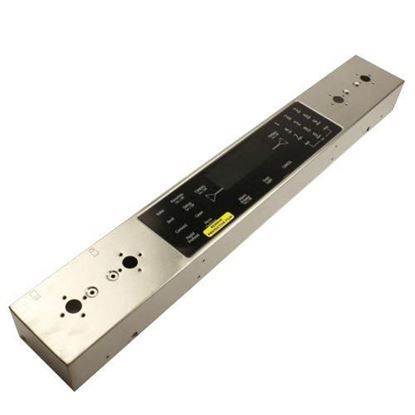
Whirlpool WP5760M339-60 Range Panel Control W/Touchpad SS

Special Price $274.18 Regular Price $315.95
Out of stock
Available Quantity:   0
SKU
WP5760M339-60

Product Description

The Whirlpool WP5760M339-60 Range Panel Control with Touchpad allows for easy and accurate control of the cooking functions. This panel can relay the inputs from the user through the touchpad and is effective in controlling the temperature and other aspects of the machine. Developed for sturdiness, it enriches the cooking process with usability, operation, and appearance. Its sleek appearance is enhanced by its stainless steel material which also makes it durable and capable of withstanding the typical conditions to ensure the smooth running of the kitchen.
Manufacturer

✓ This Product Replaces: 74011685, 5760M339-60
https://www.hnkparts.com/media/catalog/product/w/p/wp5760m339-60_whirlpool_hnkparts.jpg
Manufacturer Name: WHIRLPOOL
Product Number: WP5760M339-60
OEM Part Number: WP5760M339-60
Product Description: Panl-Cntrl Range Stainless

Choose the best Home Appliance parts and supplies from HnKParts!

  • Same Day Shipping

  • Best Quality And Best Price

  • Wide Range of Inventory

  • Best Customer Service

Have More Questions or Need Help to Place The Order?
Reach us at (866)723-0907 or [email protected]

Write Your Own Review
You're reviewing:Whirlpool WP5760M339-60 Range Panel Control W/Touchpad SS
Your Rating
Customer Questions
What maintenance is required for the Whirlpool WP5760M339-60 Panel Control With Touchpad?

Wipe the control panel and touchpad with a soft, damp cloth to remove spills, grease, or residue. Avoid abrasive cleaners or excessive moisture. Proper care ensures accurate touch input and consistent operation of range functions.

What are common issues with the Whirlpool WP5760M339-60 Panel Control With Touchpad?

  • Buttons do not respond.
  • Touchpad input errors.
  • Oven or burner fails to operate.
  • Error codes displayed.

Installation Steps

Step1: Turn off the range and disconnect power at the circuit breaker.

Step2: Pull the panel forward to access the wiring connections.

Step3: Detach the wiring harnesses from the old control panel.

Step4: Install the new panel control with touchpad and reconnect the wires securely.

Step5: Reattach the panel, restore power, and test the touchpad functions.