
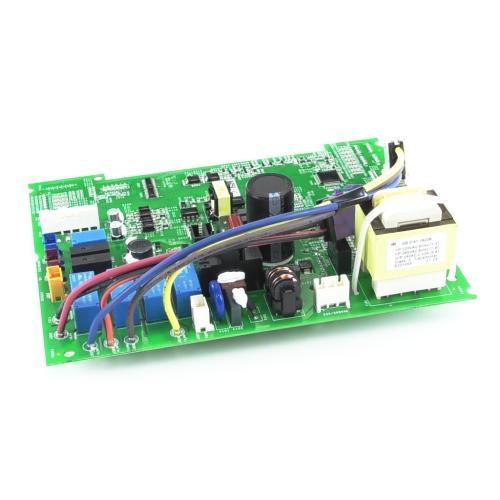
General Electric WP26X28394 AC Service Main Board

Special Price $156.21 Regular Price $190.18
Out of stock
Available Quantity:   0
SKU
WP26X28394
✓ This Product Replaces: WP26X25056

Product Description

The General Electric WP26X28394 AC Service Main Board controls electrical signals and command processing for the appliance's connected electronic components. It is mounted within the control section, linking incoming wiring with circuits responsible for system control and communication. The signals received through the connected harnesses are processed across the board and routed toward the relevant components according to selected settings and sensor information. This central electronic interface coordinates responses between the user controls and internal assemblies to maintain system commands and electrical communication synchronized for temperature regulation, fan control and other operations.
9"X2"X9"
Manufacturer

https://www.hnkparts.com/media/catalog/product/w/p/wp26x28394-general-electric-hnkparts-1.jpg
Write Your Own Review
You're reviewing:General Electric WP26X28394 AC Service Main Board
Your Rating
Customer Questions
What maintenance is required for the General Electric WP26X28394 Service Main Board?

Ensure the air conditioner is unplugged before inspecting the control board area. Keep the compartment clean and free from dust or moisture that could affect electrical components. Check wiring harnesses periodically for secure connections. Proper ventilation and clean internal components help maintain stable communication and reliable system operation.

What are common issues with the General Electric WP26X28394 Service Main Board?

  • Air conditioner fails to start.
  • Control signals stop reaching components.
  • Board overheats during operation.
  • Unit cycles on and off repeatedly.

Installation Steps

Step 1: The appliance should be disconnected from the electrical outlet prior to initiating the repair or replacement.

Step 2: Any screws that are fastening the control panel to the wall should be taken out, and then the lower part of the control panel should be elevated to slide it off.

Step 3: The two primary circuit boards situated within the control panel should be identified.

Step 4: The GE WP26X28394 service main board should be found and the wires attached to it should be recognized.

Step 5: The wiring should be gently detached from the board using needle-nose pliers.

Step 6: The board should be removed from the control panel by unscrewing it.

Step 7: The replacement board should be taken and the wiring should be attached to it in the same manner as it was on the previous board.

Step 8: The board should be reinstalled into the control panel and the control panel should be put back together.

Step 9: Power should be restored and the repair should be verified by ensuring proper functionality.

Please remember, these instructions serve as general guidance and should always be referenced alongside the manufacturer's manual, if accessible.