
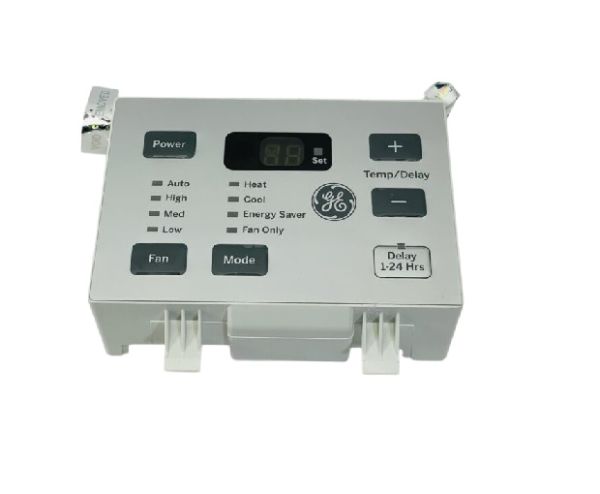
General Electric WJ26X20604 Air Conditioner Display Board Sub Assembly

Special Price $85.67 Regular Price $135.24
In stock
Available Quantity:   8
SKU
WJ26X20604

Product Description

The General Electric WJ26X20604 Air Conditioner Display Board Sub Assembly regulates and indicates certain parameters of the part. This sub-assembly deals with inputs from the user, the temperature and the speed of the fan, and the operational mode through a digital interface. It works through signals from the control panel to control the flow of cooling in the most effective manner.
Manufacturer

https://www.hnkparts.com/media/catalog/product/w/j/wj26x20604-88263.jpg
Manufacturer Name: GENERAL ELECTRIC
Product Number: WJ26X20604
OEM Part Number: WJ26X20604
Product Description: Display Board Sub Asm

Choose the best Home Appliance parts and supplies from HnKParts!

  • Same Day Shipping

  • Best Quality And Best Price

  • Wide Range of Inventory

  • Best Customer Service

Have More Questions or Need Help to Place The Order?
Reach us at (866)723-0907 or [email protected]

Write Your Own Review
You're reviewing:General Electric WJ26X20604 Air Conditioner Display Board Sub Assembly
Your Rating
Customer Questions
What maintenance is required for the General Electric WJ26X20604 Display Board Sub Assembly?

Regular inspection of the air conditioner display board for dust buildup or corrosion supports maintain proper operation. Ensure the unit is powered off before handling to avoid electrical hazards. Keep the surrounding place clean and dry to prevent moisture damage. Periodic checks ensure accurate performance and reduce unexpected display or communication failures.

What are common issues with the General Electric WJ26X20604 Display Board Sub Assembly?

  • Unresponsive or blank air conditioner display screen.
  • Flickering or inconsistent visual output.
  • Communication failure with the main control board.
  • Intermittent power or connection issues.
  • Incorrect temperature or setting readings.
  • Button or interface input not registering properly.

Installation Steps

Step1: Turn off power at breaker and unplug the air conditioner to secure electric shock.

Step2: Remove the front panel and locate the display old board assembly inside the unit.

Step3: Carefully disconnect wiring harnesses, noting their orientation.

Step4: Install the new board and secure it with screws in the original position.

Step5: Reconnect all wiring, reassemble the panel, restore power, and test functionality.