
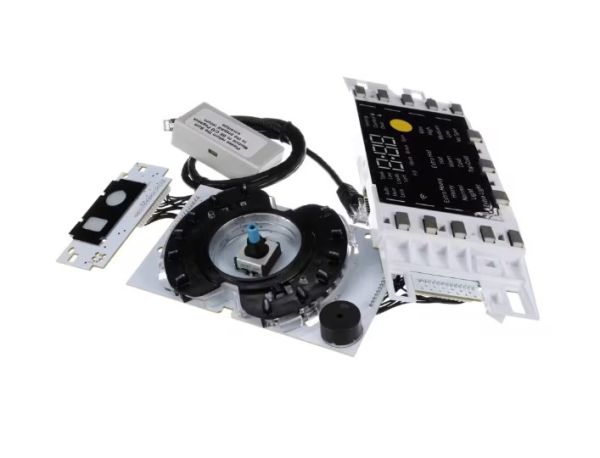
General Electric WH22X34918 Washer UI Board W/Sum & Instructions FL 650

Special Price $289.20 Regular Price $376.91
In stock
Available Quantity:   100
SKU
WH22X34918

Product Description

The General Electric WH22X34918 Washer UI-Board W/Sum & Instructions FL 650 is used as an input part for the users and controls the wash cycles and settings of the washing machine. The board receives commands from the user and interacts with the other parts of the washer to enable its correct operation. It also has a summary feature and instructional help to facilitate the use of the software. It also helps to provide more control and clear instructions to the user and improves the overall performance.
Manufacturer

✓ This Product Replaces: WH22X29547, WH22X31165, WH22X32061
https://www.hnkparts.com/media/catalog/product/w/h/wh22x34918-10575.jpg
Manufacturer Name: GENERAL ELECTRIC
Product Number: WH22X34918
OEM Part Number: WH22X34918
Product Description: Ui Board W/Sum & Instructions

Choose the best Home Appliance parts and supplies from HNKParts!

  • Same Day Shipping

  • Best Quality And Best Price

  • Wide Range of Inventory

  • Best Customer Service

Have More Questions or Need Help to Place The Order?
Reach us at (866)723-0907 or [email protected]

Write Your Own Review
You're reviewing:General Electric WH22X34918 Washer UI Board W/Sum & Instructions FL 650
Your Rating
Customer Questions
What maintenance is required for the General Electric WH22X34918 UI Board With Sum & Instructions?

Clean the surrounding control area with a soft dry cloth to remove dust or detergent residue. Avoid moisture near the control interface. Keeping the area clean helps maintain responsive controls and stable communication between user inputs and washer functions.

What are common issues with the General Electric WH22X34918 UI Board With Sum & Instructions?

  • Buttons fail to register commands.
  • Display information appears incomplete.
  • Cycle selections change unexpectedly.
  • Interface stops detecting commands.

Installation Steps

Step1: Unplug the washer to ensure safety.

Step2: Remove the control panel cover to access the UI board.

Step3: Disconnect all wiring harnesses carefully from the old board.

Step4: Install the new UI board, reconnecting each wire to its matching terminal.

Step5: Secure the board with screws and replace the control panel cover.

Step6: Restore power and run a test cycle to confirm proper functionality.