
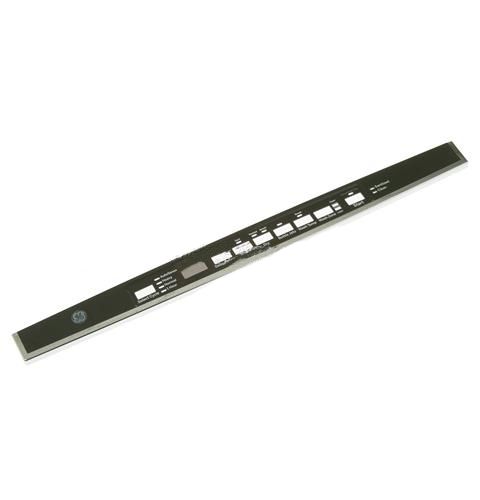
General Electric WD34X24445 Dishwasher Graphics Console Cover Assembly

Special Price $66.45 Regular Price $78.95
In stock
Available Quantity:   14
SKU
WD34X24445

Product Description

The General Electric WD34X24445 Dishwasher Graphics Console Cover Assembly is an accessory front panel overlay, which provides the labeled controls and visual supports for operating the product. It has the primary purpose of showing cycle choices and setting indicators and feature icons that are consistent with the underlying buttons and electronic interface. The cover is fitted on the face control panel and covers the existing control buttons and display holes. It facilitates easy interaction with the users, supports them in selecting their wash options correctly, and enhances stable functionality.
Console,
Manufacturer
https://www.hnkparts.com/media/catalog/product/w/d/wd34x24445_general-electric_hnkparts.png
Manufacturer Name: GENERAL ELECTRIC
Product Number: WD34X24445
OEM Part Number: WD34X24445
Product Description: Console Cvr Graphics Asm

Choose the best Home Appliance parts and supplies from HnKParts!

  • Same Day Shipping

  • Best Quality And Best Price

  • Wide Range of Inventory

  • Best Customer Service

Have More Questions or Need Help to Place The Order?
Reach us at (866)723-0907 or [email protected]

Write Your Own Review
You're reviewing:General Electric WD34X24445 Dishwasher Graphics Console Cover Assembly
Your Rating
Customer Questions
What maintenance is required for the General Electric WD34X24445 Console Cover Graphics Assembly?

Regularly wipe the dishwasher console cover with a soft, damp cloth to remove dirt and residue. Avoid abrasive cleaners to prevent scratching the graphics. Inspect for peeling or fading, and ensure buttons operate smoothly to maintain operational safety.

What are common issues with the General Electric WD34X24445 Console Cover Graphics Assembly?

  • Fading or discoloration of printed graphics.
  • Peeling or bubbling of the cover.
  • Buttons sticking or not registering presses.
  • Scratches or surface wear affecting readability.

Installation Steps

Step1: Disconnect power supply and unplug dishwasher from mains before starting.

Step2: Remove mounting screws securing the old console cover and label wiring if present.

Step3: Align the new assembly carefully onto the console panel slots.

Step4: Secure with original screws, tighten evenly, and ensure firm alignment.

Step5: Restore power and test all control functions for proper operation.
