The store will not work correctly in the case when cookies are disabled.
We collect user information to provide a better user experience and protect the security of our website. By continuing to use our website, you acknowledge the use of cookies.
✓ This Product Replaces:WD21X27258, WD21X26744, WD21X26939
Product Description
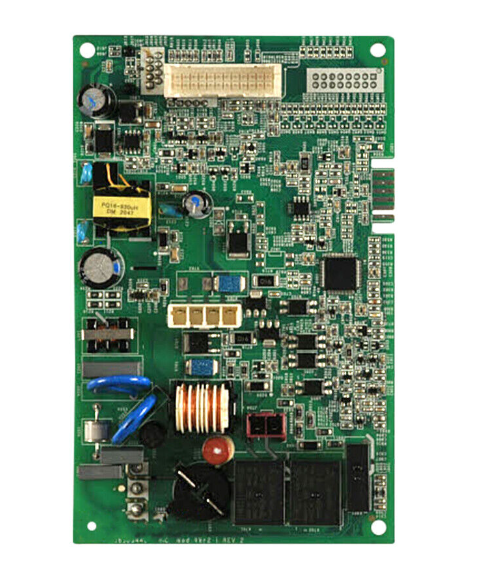
The General Electric WD21X26439 Dishwasher Main Control Board regulates the operations by interpreting user input and operating subsystems connected to it. It is installed in the rear or side control housing of the dishwasher and connects to the user interface, sensors and actuators by means of several harness connectors. The microcontroller's logic and power regulation components and signal pathways are programmed into the board to convert program selections into timed commands. The location of the switch is combined with the door latch switch and water control circuits to coordinate wash, rinse, drain and dry operations.
Step 1: The 4 screws that secure the control board should be identified. These screws should be extracted utilizing a flathead screwdriver.
Step 2: The plastic cover should be carefully detached from the control board.
Step 3: The power cables connected to the board, which are labeled P1 and P2, should be unplugged.
Step 4: The new control board should be positioned into the identical spot. The board should be ensured correctly aligned and the plastic cover should be reattached.
Step 5: The power cables should be reattached, ensuring they are firmly secured in position.
Step 6: The control board should be fastened using the four screws that were previously removed.
Step 7: The power cord should be reconnected and the power should be switched on. The new control board should now function and configure the services for your MAC device.
By following these straightforward steps, the GE WD21X26439 control board configurator services MAC can be effectively substituted. Caution should be exercised when replacing the board, as it is an electrical component. Should any inquiries arise, the device manual should be referred to or a certified technician should be reached out to for help.
Please be aware that these instructions serve as general guidance and should always be utilized alongside the manufacturer's manual, if one is available.