The store will not work correctly in the case when cookies are disabled.
We collect user information to provide a better user experience and protect the security of our website. By continuing to use our website, you acknowledge the use of cookies.
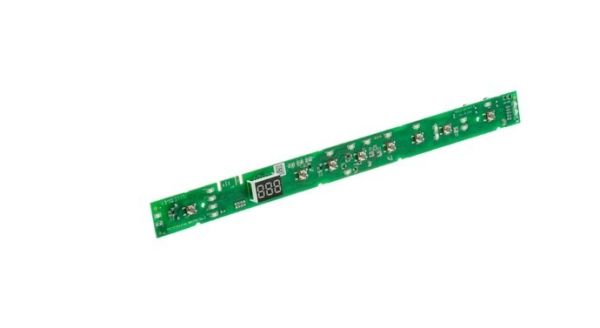
The General Electric WD21X31904 Dishwasher Configured User Interface Control Board is mounted on the dishwasher and controls the wash cycles, water temperature, and drying through digital settings. Improving efficiency makes the process easier and more effective for delivering clean dishes and a better dishwashing experience. This control board is specifically intended for particular models and ensures stability and reliability to enhance the performance of the dishwasher.
Supports communication between user selections and the dishwasher's electronic control system. The GE WD21X31904 Dishwasher User Interface Control Board is an electronic control component designed for compatible GE dishwashers. Positioned within the user interface assembly, it processes commands entered through the control panel and communicates corresponding input signals to the appliance's electronic controls. By connecting the user interface with the dishwasher control system, the board supports selection and management of available wash programs and operating functions.
User Input Processing:
User commands entered through the dishwasher control panel are received and processed by the interface system. Input signals from buttons or control selections are interpreted and transmitted to the dishwasher control system, allowing the appliance to recognize selected functions. This creates the electronic connection between user interaction and appliance operation.
Cycle Management:
Within the dishwasher operating system, the board supports communication related to cycle selection and available options. It works with the appliance controls to relay selected programs and settings, allowing the dishwasher to recognize the chosen operating mode and user preferences.
Replacement Guidelines:
Replacing the Dishwasher User Interface Control Board is appropriate if it is damaged, malfunctioning, excessively worn, or otherwise deteriorated. Verify part number WD21X31904 and the complete dishwasher model number before replacement. Replace the control board if deterioration affects user input, electronic signal processing, control response, or normal dishwasher operation.
Common Failure Symptoms:
Delayed or irregular response from control buttons or touch inputs.
Fading or wear on the user-facing control surface.
Unstable display indicators or selection controls.
Physical wear around the interface housing.
Inconsistent response to user selections.
Equipment Compatibility:
The WD21X31904 User Interface Control Board applies to GE dishwasher models that use this specific electronic interface assembly. Its design corresponds with the dishwasher's control layout and electronic communication configuration. Verify the dishwasher model details before ordering.
What maintenance is required for the General Electric WD21X31904 Dishwasher Configured User Interface Control Board?
Keep the dishwasher control panel clean and dry to protect the user interface control board. Wipe the panel gently with a soft cloth to remove grease or detergent residue. Avoid excessive moisture near the control area. Always disconnect power before performing any internal inspection or maintenance.
What are common issues with the General Electric WD21X31904 Configured User Interface Control Board?
Unresponsive buttons or touch controls.
Error codes or display malfunctions.
Dishwasher cycles not starting or stopping unexpectedly.
Intermittent or incorrect cycle selection.
What does the GE WD21X31904 User Interface Control Board handle?
It processes selections made through the dishwasher's control panel and communicates those commands to the appliance controls.
How does the interface board communicate user selections?
It receives input from the control panel and sends the corresponding electronic signals to the dishwasher's control system.
What can affect the operation of a dishwasher user interface board?
Physical damage, worn controls, inconsistent input response, or electronic communication issues can affect the interface assembly.
Why are user interface boards matched to specific dishwasher models?
Their control layout, electrical connections, and electronic configuration are designed for particular appliance models.
How does the interface board work with the dishwasher control system?
It provides the communication link between user selections and the dishwasher's electronic controls.
Installation Steps
Step1: Turn off power to the dishwasher at the circuit breaker.
Step2: Open the dishwasher door and remove the screws.
Step3: Separate the control panel area to access the interface board.
Step4: Disconnect the wiring harness from the old board carefully.
Step5: Remove mounting screws holding the board in place.
Step6: Install the new interface control board and secure it.
Step7: Reconnect wiring, reassemble the door panel, and restore power to test operation.