
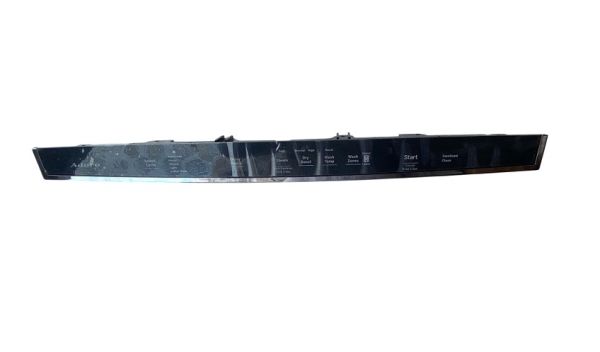
General Electric WD21X25367 Dishwasher Configured Top UI Control

Special Price $148.09 Regular Price $170.95
In stock
Available Quantity:   24
SKU
WD21X25367

Product Description

The General Electric WD21X25367 Dishwasher Configured Top UI Control, component controls the necessary functions such as washing, drying, and water discharge, through the efficient handling of electronic signals. It operates by accepting inputs from the top panel UI and processing them to control various mechanisms of the dishwasher for cleaning. It also increases, maintains, and prolongs the performance of the appliance efficiently. It is easy to install and has a long service life, which can ensure that the dishwashing efficiency is high and has no inconvenience with energy consumption during the dishwashing process.
Manufacturer

https://www.hnkparts.com/media/catalog/product/w/d/wd21x25367-59578.jpg

This Part Fits the Following Models (4)

Manufacturer Name: GENERAL ELECTRIC
Product Number: WD21X25367
OEM Part Number: WD21X25367
Product Description: Configured Top Ui Control

Choose the best Home Appliance parts and supplies from HnKParts!

  • Same Day Shipping

  • Best Quality And Best Price

  • Wide Range of Inventory

  • Best Customer Service

Have More Questions or Need Help to Place The Order?
Reach us at (866)723-0907 or [email protected]

Write Your Own Review
You're reviewing:General Electric WD21X25367 Dishwasher Configured Top UI Control
Your Rating
Customer Questions
What maintenance is required for the General Electric WD21X25367 Configured Top UI Control?

Regularly inspect the dishwasher control for moisture or residue buildup and gently clean it with a soft, dry cloth. Ensure connections remain secure and avoid exposure to excess humidity. Proper maintenance supports prevent electrical issues and ensures consistent performance. Always disconnect power before servicing.

What are common issues with the General Electric WD21X25367 Configured Top UI Control?

  • Unresponsive or delayed button inputs.
  • Display not lighting up or flickering.
  • Incorrect cycle selection or failure to start.
  • Intermittent communication errors with dishwasher components.

Installation Steps

Step1: Turn off dishwasher power at breaker and shut water supply to prevent shock or leaks.

Step2: Open dishwasher door and remove inner door panel screws using Torx driver.

Step3: Carefully disconnect old control harness and unclip assembly.

Step4: Align and connect new control ensuring secure latch.

Step5: Reattach panel, tighten screws evenly, restore power and water, test cycle.

Step6: Wear insulated gloves and verify voltage is zero before handling components.