
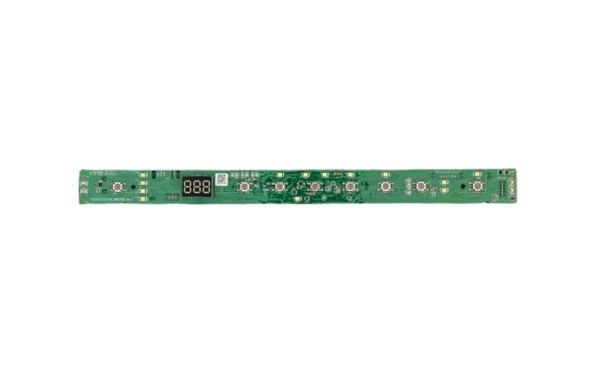
General Electric WD21X31907 Dishwasher Configured User Interface Control Board

Special Price $104.78 Regular Price $118.95
In stock
Available Quantity:   103
SKU
WD21X31907

Product Description

The General Electric WD21X31907 Dishwasher Configured User Interface Control Board has functions that control all operations. this board users can establish a smooth connection between their interface and the dishwasher's internal components to control the cycle operations. Through its precise control system, the board allows users to set wash cycle temperatures and water levels which enhances dishwasher efficiency. This part provides superior operational performance while minimizing potential breakdowns to maintain steady machine operation and extend the life duration of the system.
Manufacturer

✓ This Product Replaces: WD21X23710, WD21X23938, WD21X23699, WD21X32005
https://www.hnkparts.com/media/catalog/product/w/d/wd21x31907-66801.jpg
Manufacturer Name: GENERAL ELECTRIC
Product Number: WD21X23938
OEM Part Number: WD21X23938
Product Description: Sws:Kit Svc Ui Top Logic

Choose the best Home Appliance parts and supplies from HnKParts!

  • Same Day Shipping

  • Best Quality And Best Price

  • Wide Range of Inventory

  • Best Customer Service

Have More Questions or Need Help to Place The Order?
Reach us at (866)723-0907 or [email protected]

Write Your Own Review
You're reviewing:General Electric WD21X31907 Dishwasher Configured User Interface Control Board
Your Rating
Customer Questions
What maintenance is required for the General Electric WD21X31907 User Interface Control Board?

Wipe the UI panel gently with a soft, damp cloth to remove detergent residue or spills. Ensure buttons press smoothly and remain aligned. Proper care maintains accurate cycle selection and prevents operational errors.

What are common issues with the General Electric WD21X31907 User Interface Control Board?

  • Buttons not responding consistently.
  • Cycles not starting correctly.
  • Indicators misaligned or hard to read.
  • Touch functions intermittent or delayed.

Installation Steps

Step1: Unplug the dishwasher to prevent electrical shock.

Step2: Remove the front or top control panel to access the old board.

Step3: Disconnect all wiring connectors from the existing control board.

Step4: Position the new board and reconnect all wiring securely.

Step5: Reassemble the control panel, restore power, and test functions.