
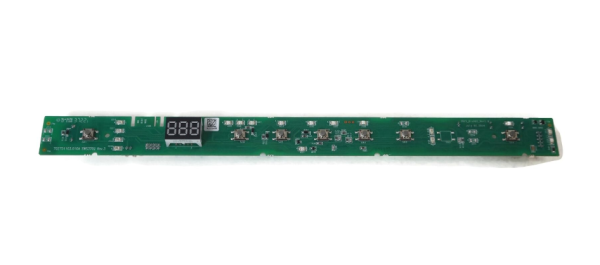
General Electric WD21X31910 Dishwasher User Interface Board

Special Price $99.96 Regular Price $113.95
In stock
Available Quantity:   429
SKU
WD21X31910

Product Description

The General Electric WD21X31910 Dishwasher Configured User Interface Control Board is a control panel that has the ability to control the settings, cycles, and operations of the appliance for proper functioning. It is designed to accept inputs from the user, to process the commands, and to control internal parts for washing, rinsing, and drying processes. Designed to be accurate, it enhances productivity, durability of the dishwasher.
Manufacturer

https://www.hnkparts.com/media/catalog/product/w/d/wd21x23461_general-electric_hnkparts.png
Manufacturer Name: GENERAL ELECTRIC
Product Number: WD21X23461
OEM Part Number: WD21X23461
Product Description: Repl: Wd21x31910

Choose the best Home Appliance parts and supplies from HnKParts!

  • Same Day Shipping

  • Best Quality And Best Price

  • Wide Range of Inventory

  • Best Customer Service

Have More Questions or Need Help to Place The Order?
Reach us at (866)723-0907 or [email protected]

Write Your Own Review
You're reviewing:General Electric WD21X31910 Dishwasher User Interface Board
Your Rating
Customer Questions
What maintenance is required for the General Electric WD21X31910 User Interface Board?

Keep the board dry and free from detergent or water splashes. Avoid pressing buttons with excessive force. Check connections periodically. Ensure the panel is mounted securely to prevent control errors or malfunction.

What are common issues with the General Electric WD21X31910 User Interface Board?

  • Board fails to respond to touch inputs.
  • Cycles stop unexpectedly.
  • Display shows incorrect information.
  • Indicator lights failure.

Installation Steps

Step1: Unplug the dishwasher to prevent electrical hazards.

Step2: Open the door and remove the inner control panel screws.

Step3: Disconnect wiring harnesses from the old interface board.

Step4: Install the new interface board, reconnecting all wiring correctly.

Step5: Restore power and run a short cycle to confirm proper operation.