
The store will not work correctly in the case when cookies are disabled.
We collect user information to provide a better user experience and protect the security of our website. By continuing to use our website, you acknowledge the use of cookies.
Observance of Labor day 09/07, Monday we are closed [No shippings and deliveries ], Orders received after 3.00pm CST on 09/04/2026 will be shipping out on Tuesday 09/08/2026.
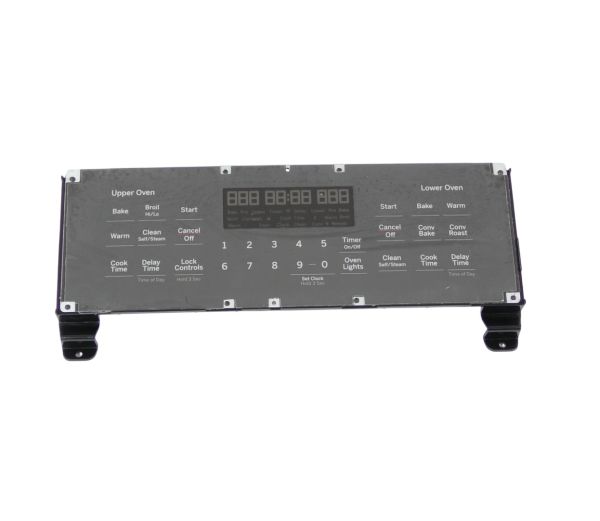
The General Electric WB27X32810 Range Overlay & Control is a front-facing interaction that regulates the essential functions through a responsive white LED display. It slides right into the control panel of the compatible range models wth a dorian gray finish. It allows precise operation of cooking settings and temperature controls by receiving user commands through the touchpad and transmitting them to the range’s electronic control board.
What maintenance is required for the GENERAL ELECTRIC WB27X32810 Overlay And Control?
Clean the overlay gently with a soft, dry cloth to preserve markings and touch sensitivity. Avoid harsh chemicals or moisture exposure. Ensure secure installation and proper alignment. Periodically test button responsiveness to maintain accurate input and proper operational control.
What are common issues with the GENERAL ELECTRIC WB27X32810 Overlay And Control?
Buttons not responding properly.
Display fading or becoming unreadable.
Incorrect settings registering.
Overlay peeling or lifting.
Installation Steps
Step1: Disconnect power to the appliance at the circuit breaker.
Step2: Remove the control panel to access the overlay and control assembly.
Step3: Peel off the old overlay and disconnect the control.
Step4: Align and install the new overlay and control unit.
Step5: Secure connections and ensure proper placement.
Step6: Restore power and test all control operations for accuracy.
