
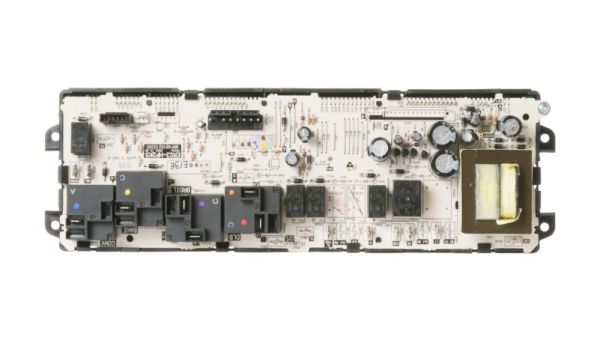
General Electric WB27T11442 Range Oven Control Board

Special Price $215.77 Regular Price $242.95
In stock
Available Quantity:   9
SKU
WB27T11442

Product Description

The General Electric WB27T11442 Range Control Board is a thermostat that controls the temperature of an oven to cook food in the right manner. It used a control board that controls the heating level according to the instructions provided by the user. The working process is based on the fact that the sensors are able to identify the changes in temperature and then regulate the heat.
Manufacturer

✓ This Product Replaces: WB27T11291
https://www.hnkparts.com/media/catalog/product/w/b/wb27t11442-82310.jpg
Manufacturer Name: GENERAL ELECTRIC
Product Number: WB27T11442
OEM Part Number: WB27T11442
Product Description: Control Oven

Choose the best Home Appliance parts and supplies from HnKParts!

  • Same Day Shipping

  • Best Quality And Best Price

  • Wide Range of Inventory

  • Best Customer Service

Have More Questions or Need Help to Place The Order?
Reach us at (866)723-0907 or [email protected]

Write Your Own Review
You're reviewing:General Electric WB27T11442 Range Oven Control Board
Your Rating
Customer Questions
What maintenance is required for the General Electric WB27T11442 Control Board?

Inspect electrical connections for corrosion and secure fit. Test oven functions to confirm accurate temperature and timer operation. Keep the board free of moisture and dust, and ensure it is firmly mounted to prevent vibration-related signal issues.

What are common issues with the General Electric WB27T11442 Control Board?

  • Delay start or timer functions failing.
  • Timers are failing to start.
  • Incorrect temperature display.
  • Indicators not responding.

Installation Steps

Step1: Shut off power supply to the oven unit.

Step2: Access the control panel by removing mounting screws.

Step3: Disconnect wiring from the existing control board.

Step4: Position the new control board and reconnect all terminals.

Step5: Secure the board and reassemble the panel.

Step6: Restore power and test oven settings and display.