
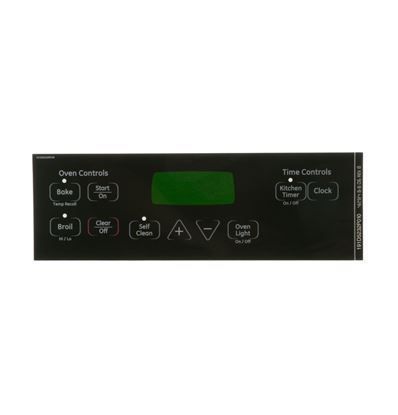
General Electric WB27T11013 Range Faceplate Graphics

Special Price $27.83 Regular Price $46.95
In stock
Available Quantity:   17
SKU
WB27T11013

Product Description

The General Electric WB27T11013 Range Faceplate Graphics provides visual identification of controls, markings, and settings located on the front interface of the appliance. Switches or buttons are related with printed signs that allow users to select the temperature levels, burner position and oven mode. It is placed on the surface of control panel and serves as a reference layer on which the operating information can be properly viewed and perceived. It assists in having the proper interaction with its users to ensure reliable functioning.
Manufacturer

https://www.hnkparts.com/media/catalog/product/w/b/wb27t11013_general-electric_hnkparts.jpg

This Part Fits the Following Models (58)

GE JBP62BM2WH Electric Range GE JBP62BM3WH Electric Range GE JBP62BM4WH Electric Range GE JBP62BM1WH Electric Range GE JBP23BR2WH Electric Range GE JBP23DR2BB Electric Range GE JBP23DR1WW Electric Range GE JBP23DR1CC Electric Range GE JBP23DR1BB Electric Range GE JBP23DN1BB Electric Range GE JBP23DIR1BB Electric Range GE JBP23DR3BB Electric Range GE JBP23DR2WW Electric Range GE JBP23DR2CC Electric Range GE JBP25BM1CT Electric Range
Showing 1-15 of 58
Manufacturer Name: GENERAL ELECTRIC
Product Number: WB27T11013
OEM Part Number: WB27T11013
Product Description: Faceplate Graphics (Bk)

Choose the best Home Appliance parts and supplies from HnKParts!

  • Same Day Shipping

  • Best Quality And Best Price

  • Wide Range of Inventory

  • Best Customer Service

Have More Questions or Need Help to Place The Order?
Reach us at (866)723-0907 or [email protected]

Write Your Own Review
You're reviewing:General Electric WB27T11013 Range Faceplate Graphics
Your Rating
Customer Questions
What maintenance is required for the General Electric WB27T11013 Faceplate Graphics?

Regularly wipe the range faceplate graphics with a soft, damp cloth to remove grease and spills. Avoid abrasive cleaners that can scratch or fade the surface. Inspect periodically for peeling or discoloration, and replace if damaged to maintain clear visibility and safety markings.

What are common issues with the General Electric WB27T11013 Faceplate Graphics?

  • Fading of graphics due to heat exposure.
  • Peeling or lifting from the surface.
  • Scratches from cleaning or utensil contact.
  • Staining from spills or cooking splatter.

Installation Steps

Step1: Disconnect power to the range at the main circuit breaker to prevent electrical shock.

Step2: Remove all control knobs and gently peel off the old faceplate graphics overlay.

Step3: Align the overlay carefully with the control panel and press firmly to adhere.

Step4: Reinstall knobs, ensure correct alignment, and restore power after verifying proper operation and visibility.

Step5: Check all labels are secure and legible.