
Special Price
$70.03
Regular Price
$95.36
In stock
Available Quantity:
23
SKU
WB27K10255
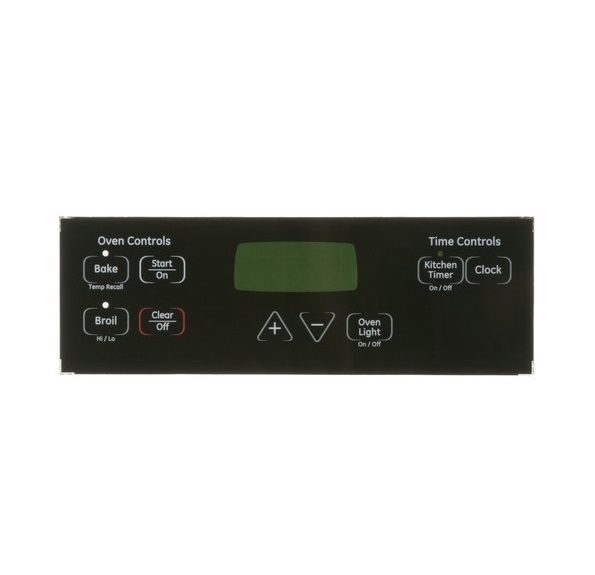
The General Electric WB27K10255 Range Overlay T09 is a design layer that is placed on the front side of the panel to label and indicate the options to be selected. Its primary function is to ensure that symbols and operating signals are clearly identified to be used correctly. The overlay is based on relating the printed designations to the underlying commands to allow visual reference. It is mounted on the front operating surface and is attached by sticking to the specific area.
Manufacturer

This Part Fits the Following Models (143)
GE JBS27SM1SS Electric Range
GE JBS27SIM1SS Electric Range
GE JBS27DM1WW Electric Range
GE JBS27DM2BB Electric Range
GE JBS27DM1BB Electric Range
GE JBS27DM1CC Electric Range
GE JGBS18DEN1WW Gas Range
GE JGBS18DEN1CC Gas Range
GE JGBS17DEM2BB Gas Range
GE JGBS17DEM1BB Gas Range
GE JGBS17DEM2WW Gas Range
GE JGBS18DEN2BB Gas Range
GE JGBS18DEN3WW Gas Range
GE JGBS18DEN3CC Gas Range
GE JGBS18DEN2WW Gas Range
Showing 1-15
of 143
| Manufacturer Name: GENERAL ELECTRIC Product Number: WB27K10255 OEM Part Number: WB27K10255 Product Description: Overlay T09 |
Choose the best Home Appliance parts and supplies from HnKParts!
Same Day Shipping
Best Quality And Best Price
Wide Range of Inventory
Best Customer Service
Have More Questions or Need Help to Place The Order?
Reach us at (866)723-0907 or [email protected]
Write Your Own Review
Customer Questions
Installation Steps
Step1: Turn off power to range at breaker to avoid electrical shock.
Step2: Open control panel and carefully remove old overlay without damaging buttons.
Step3: Clean surface to remove adhesive residue and ensure dry fit area.
Step4: Align new overlay carefully with control markings before pressing down.
Step5: Press firmly to secure adhesion, restore power, test all controls safely.
