The store will not work correctly in the case when cookies are disabled.
We collect user information to provide a better user experience and protect the security of our website. By continuing to use our website, you acknowledge the use of cookies.
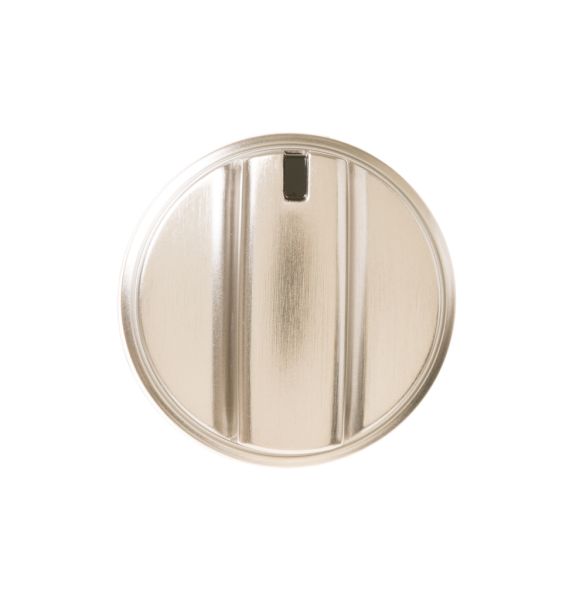
The General Electric WB03X24818 Range Knob ensures precise control over burner settings for efficient cooking. It smoothly rotates to adjust heat levels, engaging the burner mechanism for accurate temperature regulation. Designed for durability, it securely fits compatible General Electric ranges for reliable performance. The high-quality stainless steel construction enhances longevity and resists wear. Its ergonomic design allows effortless operation, improving cooking convenience. A sleek finish adds a modern touch, complementing the kitchen’s aesthetic while maintaining functionality.
Step 1: The screws located on the control panel of your GE appliance adjacent to the current WB03X24818 GE Control Knob should be identified. With the Phillips head screwdriver, the screws should be taken out and set aside.
Step 2: After the screws have been taken out, the control panel should be gently detached from the GE appliance.
Step 3: Beneath the control panel, two metal clips will be visible that are attached to the WB03X24818 GE Control Knob. The clips should be carefully removed to disengage the knob.
Step 4: The new WB03X24818 GE Control Knob should be inserted in place and the metal clips should be securely reattached.
Step 5: The control panel should be repositioned and followed with the screws. The Phillips head screwdriver should be utilized to tighten the screws until secure.
Having replaced the WB03X24818 GE Control Knob, your GE appliance should be reconnected to the wall socket and its functionality should be tested. Well done, the replacement of your WB03X24818 GE Control Knob has been successfully executed using this DIY guide!
Remember, these instructions serve as general guidance and should always be utilized alongside the manufacturer's manual, if one is available.