
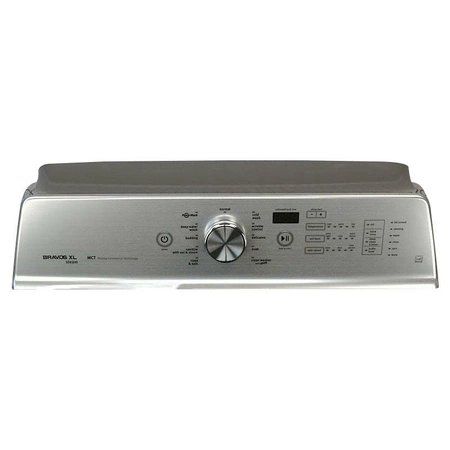
Whirlpool W11226503 Washer Control Panel

Special Price $216.61 Regular Price $239.95
Out of stock
Available Quantity:   0
SKU
W11226503

Product Description

The Whirlpool W11226503 Washer Control Panel simplifies laundry management with intuitive controls for seamless operation. This essential component serves as the interface for selecting wash cycles, adjusting settings, and monitoring the washing process. Designed to work effortlessly, it sends signals to the washer’s internal system, ensuring precise water levels, spin speeds, and wash durations. With clearly labeled buttons and a user-friendly layout, it allows for simple customization of each load. Enjoy the convenience of optimized cleaning performance, efficient water usage, and tailored fabric care at your fingertips. This control panel enhances usability, making everyday laundry tasks straightforward and effective.
Console,
Manufacturer
✓ This Product Replaces: W10681982
https://www.hnkparts.com/media/catalog/product/w/1/w11226503-27599.JPG
Manufacturer Name: WHIRLPOOL
Product Number: W11226503
OEM Part Number: W11226503
Product Description: Console

Choose the best Home Appliance parts and supplies from HnKParts!

  • Same Day Shipping

  • Best Quality And Best Price

  • Wide Range of Inventory

  • Best Customer Service

Have More Questions or Need Help to Place The Order?
Reach us at (866)723-0907 or [email protected]

Write Your Own Review
You're reviewing:Whirlpool W11226503 Washer Control Panel
Your Rating
Customer Questions
What maintenance is required for the Whirlpool W11226503 Control Panel?

Regularly wipe the washer control panel with a soft, damp cloth to remove dust and detergent residue. Avoid harsh chemicals to prevent damage. Ensure buttons and display remain dry. This helps maintain proper functionality and prevents accidental malfunctions.

What are common issues with the Whirlpool W11226503 Control Panel?

  • Unresponsive or sticky buttons.
  • Display errors or blank screen.
  • Incorrect cycle selections.
  • Malfunctioning indicators or lights.

Installation Steps

Step1: Disconnect power at the circuit breaker before servicing the control panel.

Step2: Remove the mounting screws securing the existing control panel assembly.

Step3: Take a note of all wire connections, then disconnect the wiring harnesses carefully.

Step4: Remove the old control panel and position the new control panel in the same location.

Step5: Reconnect all harnesses and secure the panel with the original mounting hardware.

Step6: Restore power and verify that all buttons, indicators, and cycle selections respond correctly.
