
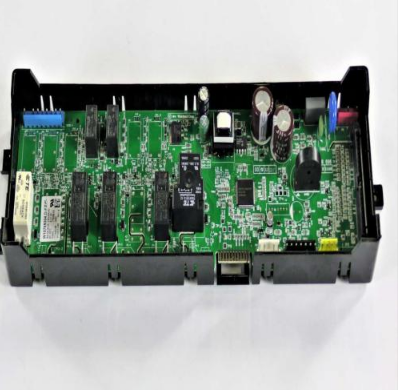
Whirlpool W11100619 Range Electronic Control Board

Special Price $191.21 Regular Price $335.59
In stock
Available Quantity:   38
SKU
W11100619

Product Description

The Whirlpool W11100619 Range Electronic Control Board controls and coordinates essential cooking functions to achieve accurate performance of the oven. This vital part controls the temperature settings, the oven modes, and the timers by receiving the input of the user and sending the commands to the heating elements and the sensors. It provides proper and uniform baking or broiling cycles when properly installed.
Manufacturer

https://www.hnkparts.com/media/catalog/product/w/1/w11100619_whirlpool_hnkparts.png

This Part Fits the Following Models (2)

Manufacturer Name: WHIRLPOOL
Product Number: W11100619
OEM Part Number: W11100619
Product Description: Cntrl-Elec

Choose the best Home Appliance parts and supplies from HnKParts!

  • Same Day Shipping

  • Best Quality And Best Price

  • Wide Range of Inventory

  • Best Customer Service

Have More Questions or Need Help to Place The Order?
Reach us at (866)723-0907 or [email protected]

Write Your Own Review
You're reviewing:Whirlpool W11100619 Range Electronic Control Board
Your Rating
Customer Questions
What maintenance is required for the Whirlpool W11100619 Electronic Control Board?

Regularly inspect the range control board for signs of dust, moisture, or loose connections. Clean gently with a dry, soft cloth, and ensure the range is unplugged during maintenance. Proper supporte prevents malfunction and ensures accurate electronic operation.

What are common issues with the Whirlpool W11100619 Electronic Control Board?

  • Unresponsive touchpad or buttons.
  • Erratic display readings.
  • Range not heating correctly.
  • Failure to retain programmed settings.

Installation Steps

Step1: Disconnect Range power supply for safety.

Step2: Remove rear panel of the range carefully.

Step3: Take out the faulty control board.

Step4: Disconnect wiring harness gently

Step5: Install new board and secure it.

Step6: Reconnect all wiring connections.

Step7: Reassemble the panel properly.

Step8: Restore power and test operation carefully.