
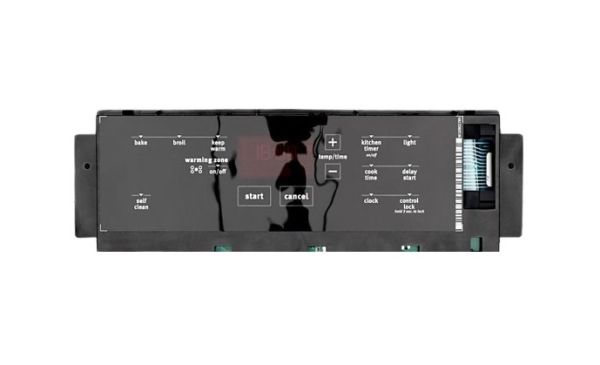
Whirlpool W11092468 Range Electronic Control Board W/Touchpad

Special Price $253.57 Regular Price $335.59
In stock
Available Quantity:   33
SKU
W11092468

Product Description

The Whirlpool W11092468 Electronic Control Board is used to instrumental in the proper functioning of the range. Regulates the heating, temperature, and time settings of the appliance, among other functions, and controls the electrical signals that are used to power based on the input received from the interface. This control board fixes that defective in some way and includes better performance and accurate temperature.
Manufacturer

https://www.hnkparts.com/media/catalog/product/w/1/w11092468-62496.jpg
Manufacturer Name: WHIRLPOOL
Product Number: W11092468
OEM Part Number: W11092468
Product Description: Cntrl-Elec+Core

Choose the best Home Appliance parts and supplies from HnKParts!

  • Same Day Shipping

  • Best Quality And Best Price

  • Wide Range of Inventory

  • Best Customer Service

Have More Questions or Need Help to Place The Order?
Reach us at (866)723-0907 or [email protected]

Write Your Own Review
You're reviewing:Whirlpool W11092468 Range Electronic Control Board W/Touchpad
Your Rating
Customer Questions
What maintenance is required for the Whirlpool W11092468 Control Board With Touchpad?

Keep the range control board clean and dry by wiping it with a soft, damp cloth to prevent residue buildup. Avoid excessive moisture and power surges by using a surge protector. Regularly inspect connections for looseness or corrosion. Always disconnect power before servicing for safety.

What are common issues with the Whirlpool W11092468 Control Board With Touchpad?

  • Unresponsive or partially working touchpad controls.
  • Display not lighting up or showing error codes.
  • Intermittent power or failure to start heating operations.
  • Incorrect temperature regulation.

Installation Steps

Step1: Disconnect Range power supply at breaker for safety.

Step2: Remove rear panel of range carefully.

Step3: Disconnect wiring harness from old control board.

Step4: Mount new control board securely in place.

Step5: Reconnect all wire connectors firmly.

Step6: Reinstall panel and restore power, test touchpad.