
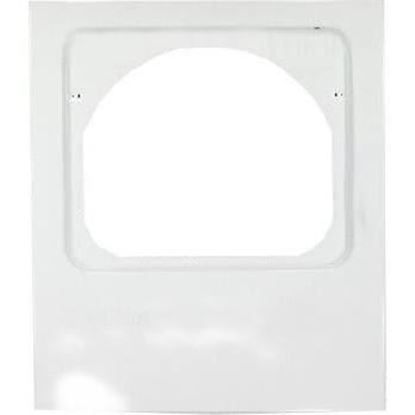
Whirlpool W10806345 Dryer Panel

Special Price $133.02 Regular Price $147.95
In stock
Available Quantity:   24
SKU
W10806345
✓ This Product Replaces: W10224853, W10664697

Product Description

This Whirlpool W10806345 Front Panel is used for the front panel to give a new look and proper functioning in the dryer. Affixes the front dryer and provides convenient access to the controls and the drum for enhanced drying. Capable of enduring normal use and increasing durability. Simple to install and fits better to ensure a proper flow of air and insulation to enhance energy efficiency.
Manufacturer

https://www.hnkparts.com/media/catalog/product/w/1/w10806345_whirlpool_hnkparts.jpg

This Part Fits the Following Models (225)

Maytag MEDB755DW1 Dryer Maytag MEDB755DW0 Dryer Maytag YMEDC300BW0 Dryer Maytag YMEDC555DW1 Dryer Maytag YMEDC555DW0 Dryer Maytag YMEDB755DW0 Dryer Maytag YMEDB755DW1 Dryer Maytag YMEDB755DW2 Dryer Maytag YMEDX500BW0 Dryer Maytag MEDC200XW3 Dryer Maytag MEDC215EW0 Dryer Maytag MEDC215EW1 Dryer Maytag MEDC300BW0 Dryer Maytag MEDX6STBW1 Dryer Maytag MEDX655DW1 Dryer
Showing 1-15 of 225
Manufacturer Name: WHIRLPOOL
Product Number: W10806345
OEM Part Number: W10806345
Product Description: Panel (Dw1ah)

Choose the best Home Appliance parts and supplies from HnKParts!

  • Same Day Shipping

  • Best Quality And Best Price

  • Wide Range of Inventory

  • Best Customer Service

Have More Questions or Need Help to Place The Order?
Reach us at (866)723-0907 or [email protected]

Write Your Own Review
You're reviewing:Whirlpool W10806345 Dryer Panel
Your Rating
Customer Questions
What maintenance is required for the Whirlpool W10806345 Panel?

Regularly wipe the dryer panel with a soft, dry cloth to remove dust and debris. Avoid chemicals to prevent damage. Ensure buttons and display remain responsive, and disconnect power before cleaning for better.

What are common issues with the Whirlpool W10806345 Panel?

  • Unresponsive or stuck buttons.
  • Display not illuminating properly.
  • Incorrect or missing cycle indicators.
  • Panel failing to communicate with dryer controls.

Installation Steps

Step1: Disconnect dryer from power supply completely and ensure drum is cool.

Step2: Remove screws securing old control panel or front panel cover using appropriate screwdriver.

Step3: Carefully detach wiring harness noting and label connections.

Step4: Align new Dryer Panel with mounting points properly.

Step5: Reconnect wiring securely and firmly fasten screws.

Step6: Restore power and safely test dryer operations.

Step7: Check operation for normal heating and controls.