
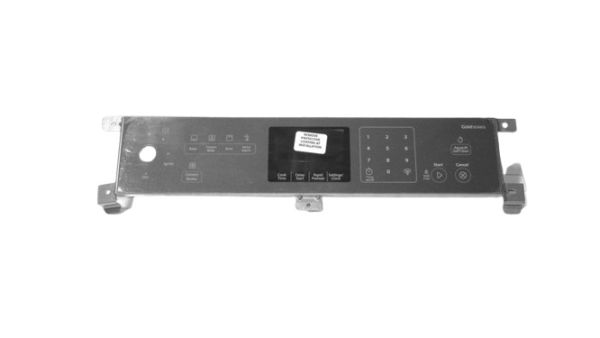
Whirlpool W10728523 Range Membrane Switch Assembly

Special Price $165.46 Regular Price $181.95
In stock
Available Quantity:   7
SKU
W10728523

Product Description

The Whirlpool W10728523 Range Control Membrane Switch Assembly works by sending electrical signals to the control board, which allows the users to change the temperature settings, timers, and other cooking modes with ease. It is a part that allows for precise control of many cooking functions on a range. This assembly helps in the functionality of the appliance and makes the operation of the range smooth and convenient in the kitchen, making it a part of maintaining better cooking performance and range operation.
Manufacturer

https://www.hnkparts.com/media/catalog/product/w/1/w10728523-84260.jpg
Manufacturer Name: WHIRLPOOL
Product Number: W10728523
OEM Part Number: W10728523
Product Description: Swtch-Memb

Choose the best Home Appliance parts and supplies from HnKParts!

  • Same Day Shipping

  • Best Quality And Best Price

  • Wide Range of Inventory

  • Best Customer Service

Have More Questions or Need Help to Place The Order?
Reach us at (866)723-0907 or [email protected]

Write Your Own Review
You're reviewing:Whirlpool W10728523 Range Membrane Switch Assembly
Your Rating
Customer Questions
What maintenance is required for the Whirlpool W10728523 Membrane Switch Assembly?

Press each control area gently to verify consistent response. Keep the membrane surface free from grease buildup that may interfere with signal detection. Confirm proper alignment with the control panel, and shut off power before replacing or reseating the switch.

What are common issues with the Whirlpool W10728523 Membrane Switch Assembly?

  • Buttons are not responding consistently.
  • Commands are registering multiple times.
  • Cooking settings are not activating.
  • Control panel failing to accept selections.

Installation Steps

Step1: Turn off power to the range.

Step2: Remove the control panel to access the membrane switch.

Step3: Peel off the old membrane from the panel surface.

Step4: Disconnect the ribbon cable from the control board.

Step5: Align and apply the new membrane, then reconnect cable.

Step6: Reassemble the panel and restore power to test input.