The store will not work correctly in the case when cookies are disabled.
We collect user information to provide a better user experience and protect the security of our website. By continuing to use our website, you acknowledge the use of cookies.
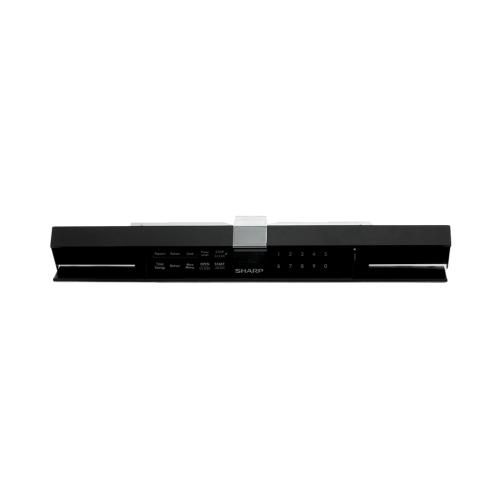
The Sharp CPNLCB970MRK0 Microwave Oven Control Panel allows users to set cooking durations and temperatures accurately. The control panel makes it easy for users to change the cooking settings. It supports the appliance by making the kitchen work more efficiently.
Providing the user-facing control interface for the microwave, the Sharp CPNLCB970MRK0 Microwave Control Panel is an OEM control-panel component used with the applicable Sharp microwave models. The panel brings the available user controls together in one front-facing assembly and forms part of the microwave's operating interface.
Control Interface:
The control panel provides the physical interface for entering user selections into the microwave. Its control layout is configured as part of the appliance's operating interface, allowing the available controls to be accessed from the front of the microwave.
Microwave Operation:
During microwave operation, the control panel serves as the user input point for selecting available functions. Selections made through the panel allow the applicable microwave operation to be initiated according to the appliance's available controls.
Replacement Guidelines:
Replacement may be appropriate when the existing control panel is physically damaged, unresponsive, or no longer provides the intended user-facing control function. The Sharp CPNLCB970MRK0 Microwave Control Panel can restore the appliance's control interface when the original panel no longer performs as intended.
Common Signs of Wear:
Microwave controls not responding.
Individual control functions becoming unavailable.
Inconsistent response from the control panel.
Damaged or cracked control-panel surface.
Difficulty selecting available microwave functions.
Equipment Compatibility:
The Sharp CPNLCB970MRK0 Microwave Control Panel is an OEM part compatible with Sharp SMD2480CS and SMD2480CSC microwave models. These are the verified fit models for this control panel, so the microwave model should be matched with the listed compatibility information before selecting the part.
What maintenance is required for the Sharp CPNLCB970MRK0 Control Panel?
Clean the microwave control panel regularly with a soft, slightly damp cloth to remove grease and food residue. Avoid harsh cleaners or excess moisture near the control area. Ensure buttons remain free from buildup for proper operation. Disconnect the microwave from power before internal servicing.
What are common issues with the Sharp CPNLCB970MRK0 Control Panel?
Buttons unresponsive.
Time or cooking settings incorrect.
Microwave fails to start, stops unexpectedly.
Error codes displayed during operation.
Does the CPNLCB970MRK0 control panel operate the microwave's functions?
Yes. The CPNLCB970MRK0 provides the user-facing interface used to select the available functions of the compatible Sharp microwave.
What type of user interface does the CPNLCB970MRK0 provide?
It provides the front-facing control interface through which users interact with the microwave's available controls.
What happens when a microwave control panel stops responding?
An unresponsive control panel can prevent users from selecting or accessing microwave functions through the appliance's normal user interface.
What are common reasons to replace a microwave control panel?
Replacement may be appropriate when the control panel has physical damage or its controls no longer respond as intended.
How is the CPNLCB970MRK0 different from a microwave control board?
The CPNLCB970MRK0 is a microwave control panel, serving as the user-facing control interface rather than being identified as an internal control board.
Installation Steps
Step1: Disconnect the microwave from the power outlet for safety.
Step2: Remove the mounting screws from the top grille and take the grille off.
Step3: Lift the old control panel slightly and disconnect the wire harness.
Step4: Connect the wiring to the new control panel.
Step5: Align the panel with the mounting slots and secure it with screws.
Step6: Reattach the grille, restore power, and test the microwave controls.