The store will not work correctly in the case when cookies are disabled.
We collect user information to provide a better user experience and protect the security of our website. By continuing to use our website, you acknowledge the use of cookies.
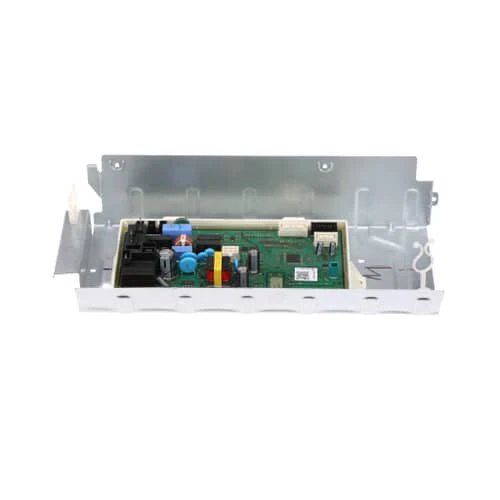
The Samsung DC97-21429E Washing Machine PCB Cover Assembly is mounted within the control panel section of the washer to shield and stabilize the printed circuit board that allows the electronic components to operate consistently. This part serves as a shielding and mounting frame of the control board, to ensure safe connections when the machine is in operation.
Within the washer’s electronic control area, the Samsung DC97-21429E Washer PCB Cover Assembly encloses the printed circuit board and provides structural support around the control component. This genuine OEM part helps keep the board properly housed within its electronic control section.
PCB Cover Enclosure:
The cover assembly surrounds the printed circuit board and provides physical separation between the board and nearby appliance components. Its enclosure structure helps keep the electronic control board contained within the designated control section.
Control Board Positioning:
Within the appliance's control area, the PCB cover helps maintain the circuit board in its intended position. This supports the organized placement of the board and its associated electrical connections during appliance operation.
Replacement Guidelines:
Replacement of the Samsung DC97-21429E PCB cover assembly may be appropriate when the existing cover is cracked, broken, deformed, or has damaged mounting areas that prevent proper enclosure of the PCB. The replacement cover should match the appliance's specified control-board configuration.
Common Failure Symptoms:
Cracked or broken PCB cover
Deformed cover structure
Damaged mounting points
Loose or improperly positioned cover
Visible separation around the PCB enclosure
Equipment Compatibility
The Samsung DC97-21429E is a genuine OEM PCB cover assembly compatible with selected Samsung dryer models, including DVG45T6200W/A3 and DVE45T6200W/A3. Verify the complete appliance model number and PCB configuration before selecting the replacement.
What maintenance is required for the Samsung DC97-21429E PCB Cover Assembly?
Regularly inspect the washing machine PCB cover for cracks, dust, or moisture buildup. Clean gently with a dry cloth and ensure connections are secure. Proper maintenance prevents electrical shorts and ensures better operation. Avoid using water or chemicals near the board.
What are common issues with the Samsung DC97-21429E PCB Cover Assembly?
Cracks or breaks in the cover.
Dust accumulation causing overheating.
Loose or misaligned connections.
Potential water ingress affecting PCB performance.
What does the DC97-21429E cover around the PCB?
The DC97-21429E surrounds the washer's printed circuit board within the designated electronic control area, keeping the board housed within its control section.
How does the PCB cover relate to the washer's control board?
The cover provides the physical enclosure around the control board while the PCB itself performs the washer's electronic control functions.
Why does the PCB cover have mounting areas?
The mounting areas allow the cover assembly to remain positioned around the PCB within the washer's electronic control section.
Can a damaged PCB cover affect the position of the control board?
Yes. Damage or deformation of the cover can affect how the PCB is housed or positioned within its designated control area.
Is the DC97-21429E a circuit board or a PCB cover?
The DC97-21429E is a PCB cover assembly. It provides the enclosure and physical support around the printed circuit board rather than serving as the electronic control board itself.
Installation Steps
Step1: Unplug the washing machine and ensure the power is off.
Step2: Open the top/rear panel using proper tools and remove screws carefully.
Step3: Locate the PCB area and remove the old cover assembly gently.
Step4: Align the new cover and secure clips/screws firmly.
Step5: Reassemble the panel and tighten all screws properly.
Step6: Restore power and test machine operation for safety.
Step7: Check PCB cover is seated properly to avoid vibration or moisture exposure.