The store will not work correctly in the case when cookies are disabled.
We collect user information to provide a better user experience and protect the security of our website. By continuing to use our website, you acknowledge the use of cookies.
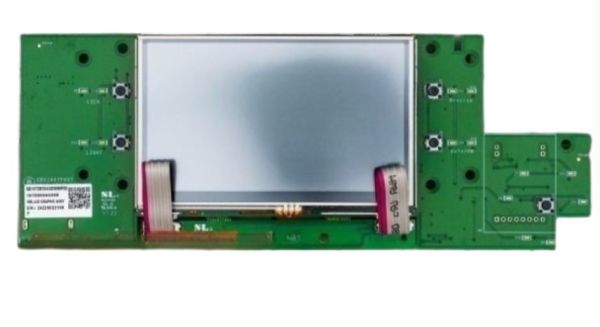
The General Electric WR55X45229 Refrigerator LCD Board Graphic Assembly is a replacement part that regulates graphic interface functionality in the control system of the appliance. It also takes the input of user selections and displays temperature selections, status indicators and menu items on the front panel. It is fitted behind the display space and is connected to the main control circuitry of the appliance to send and receive control signals. Its functionality supports effective communication between the user and internal parts to perform its adjustments.
Provides the user-facing interface for refrigerator settings, status details, and other available information, the GE WR55X45229 Refrigerator LCD Board Graphic Assembly forms part of the refrigerator's LCD display assembly. It supports the presentation of information available through the refrigerator's display.
LCD Signal Communication:
Electronic information from the refrigerator’s control system passes through the LCD board for presentation on the display. Its function centers on handling display-related electronic communication so applicable information can be shown through the LCD.
Graphic User Interface:
User-facing display functions are supported through the graphic assembly, which forms part of the refrigerator’s LCD display area. It presents available settings, operating information, and status details through the display.
Replacement Guidelines:
Replace the GE WR55X45229 Refrigerator LCD Board Graphic Assembly when the display assembly becomes damaged or no longer performs its intended interface functions. Replacement may also be appropriate when display information becomes inconsistent or user selections are no longer communicated normally through the interface.
Common Failure Symptoms:
LCD display remaining blank or failing to appear
Portions of the display becoming missing or incomplete
Refrigerator information not being displayed correctly
The LG EBR32881202 Refrigerator PCB Main Control Board Assembly should be matched to the applicable LG refrigerator by verifying the complete refrigerator model number and part number EBR32881202 before purchase.
What maintenance is required for the GE WR55X45229 LCD Board Graphic Assembly?
Keep the graphic display area clean and free of grease or residue with a soft, damp cloth to maintain visibility. Avoid harsh liquids that can seep into electronic components. Inspect for loose connector harnesses during service intervals. Disconnect power before any control board access to prevent shock or damage.
What are common issues with the GE WR55X45229 LCD Board Graphic Assembly?
Display fails to show information correctly.
Buttons or controls unresponsive.
Error codes appear unexpectedly.
Settings do not save correctly.
How does an LCD board differ from a refrigerator main control board?
An LCD board supports the visual display interface, while a main control board handles broader electronic control functions within the refrigerator.
What type of information can the WR55X45229 display assembly present?
The display assembly can present supported refrigerator settings, status details, and other user-facing information based on the functions provided by the refrigerator configuration.
Why can only part of a refrigerator LCD become unreadable?
A display problem can affect specific portions of the LCD, resulting in missing sections, incomplete information, or certain areas failing to appear.
Does the WR55X45229 directly control refrigerator cooling?
No. The WR55X45229 is associated with the refrigerator's display interface rather than directly controlling refrigeration functions.
Which refrigerator component does WR55X45229 identify?
WR55X45229 identifies a GE Refrigerator LCD Board Graphic Assembly associated with the display system on selected GE refrigerator configurations.
Installation Steps
Step1: Unplug the refrigerator to prevent electrical shock.
Step2: Remove the dispenser control panel cover.
Step3: Disconnect the ribbon cable and wiring harness from the old LCD board.
Step4: Install the new LCD board and reconnect wiring securely.
Step5: Reassemble the panel and restore power to verify display operation.