The store will not work correctly in the case when cookies are disabled.
We collect user information to provide a better user experience and protect the security of our website. By continuing to use our website, you acknowledge the use of cookies.
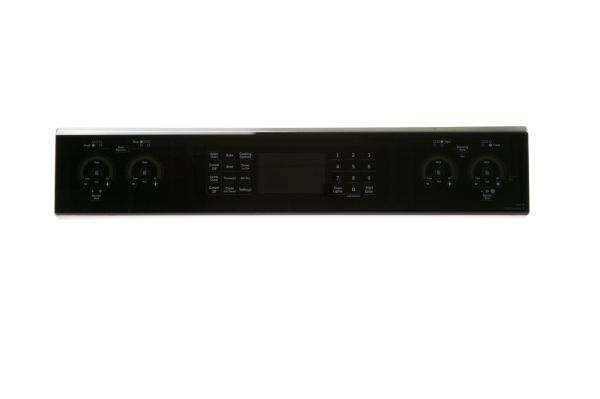
The General Electric WB27X45309 Oven-Control Panel Stainless helps as a system to control settings and operational functions. This integrated component allows to manage temperature settings in addition to baking modes and timer functions for a smooth working of the element. This control panel operates as a perfect replacement part for particular GE models.
Serves the designated front panel area for presenting the range controls in an accessible arrangement. The General Electric WB27X45309 Control Panel Stainless Steel is an OEM replacement that forms the front-facing panel section, establishing the specified surface and physical structure around the range control area.
Control Interface:
Organizes the user-accessible control region by providing a defined surface for interaction with the range controls. Its layout establishes a clear interface area for the control elements while keeping the focus on user access rather than the panel’s overall physical construction.
Panel Structure:
Defines the panel’s physical form through its stainless steel construction, maintaining the specified material and structural surface. The formed panel establishes the required physical configuration across its designated section without repeating the control-access function.
Replacement Guidelines:
Replacement of the General Electric WB27X45309 Range Control Panel Stainless Steel may be appropriate when the existing panel is cracked, bent, dented, heavily scratched, or otherwise damaged and no longer maintains its intended physical condition. Visible deterioration or deformation across the panel surface can indicate that the panel requires replacement.
Common Failure Symptoms:
Visible dents or deformation across the panel surface.
Scratches or damage affecting the stainless steel finish.
Cracks developing around the panel structure.
Uneven positioning across the front control area.
Separation or looseness along the panel edges.
Equipment Compatibility:
The General Electric WB27X45309 Range Control Panel Stainless Steel is intended as an OEM replacement for compatible GE ranges requiring the corresponding range control panel configuration. Verify the WB27X45309 range model, control panel configuration, panel requirements, and manufacturer’s parts documentation before purchasing.
What maintenance is required for the General Electric WB27X45309 Control Panel?
Clean the control surface gently to remove grease that may block proper button response. Ensure the interface remains dry before starting cooking cycles. Verify the timer, temperature entry, and operation keys respond correctly when adjustments are made during operation.
What are common issues with the General Electric WB27X45309 Control Panel?
Buttons not responding to input.
Timer failing to start countdown.
Display not updating after selection.
Oven program not starting.
What does the GE WB27X45309 range control panel do?
The WB27X45309 forms the designated front-facing panel area where the range controls are presented, establishing the defined surface across the control section.
What should I check before purchasing the WB27X45309 control panel?
Confirm that your range requires the WB27X45309 control panel configuration and verify the corresponding part information before purchasing.
How does the WB27X45309 control panel fit into the range control section?
The panel establishes the front-facing area for the range controls and maintains their designated physical arrangement within the control section.
Why is the WB27X45309 suitable for a range requiring a stainless steel control panel?
The WB27X45309 is constructed from stainless steel and provides the specified front-facing panel surface for the range control section.
How can I identify the correct GE WB27X45309 range control panel?
The WB27X45309 part number identifies the General Electric Range Control Panel Stainless Steel and distinguishes its corresponding panel configuration.
Installation Steps
Step1: Cut power to the oven at the circuit breaker.
Step2: Unscrew and detach the existing control panel assembly.
Step3: Disconnect wiring harnesses while noting their positions.
Step4: Align the new panel and reconnect all wires.
Step5: Secure firmly with screws to ensure stability.
Step6: Restore power and test all control settings for proper function.