
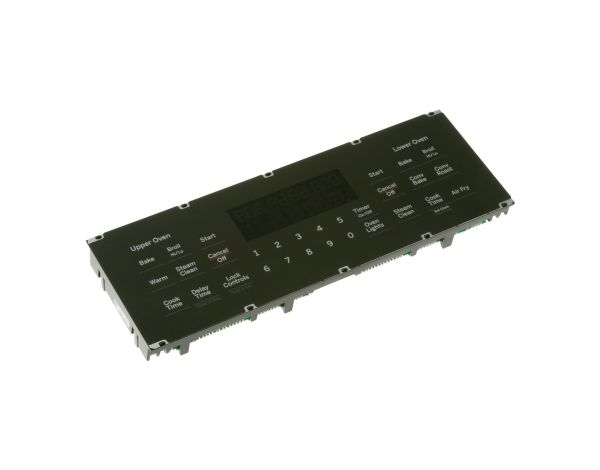
Ge WB27X41655 Oven Control & Faceplate

Special Price $169.18 Regular Price $235.69
In stock
Available Quantity:   67
SKU
WB27X41655

Product Description

The General Electric WB27X41655 Oven Control Board & Faceplate translates user input from buttons or touch screen into timed electrical controls for bake, broil and other cycles. It tracks back feed from temperature sensors and moves to correct heat levels and cycle progression.
Manufacturer

https://www.hnkparts.com/media/catalog/product/w/b/wb27x41655.jpg

This Part Fits the Following Models (7)

Write Your Own Review
You're reviewing:Ge WB27X41655 Oven Control & Faceplate
Your Rating
Customer Questions
What maintenance is required for the GE WB27X41655 Control & Faceplate?

Clean the faceplate gently with a microfiber cloth to remove grease and fingerprints. Avoid using abrasive cleaners that may damage markings. Ensure buttons remain unobstructed for accurate input. Periodically check for secure mounting to maintain proper alignment and responsive operation.

What are common issues with the GE WB27X41655 Control & Faceplate?

  • Display not illuminating properly.
  • Unresponsive control inputs.
  • Incorrect temperature settings registering.
  • Control panel failing to activate.

Installation Steps

Step1: Turn off oven power at the breaker before starting installation.

Step2: Remove the front control panel cover carefully for access.

Step3: Disconnect wiring harnesses from the existing control board.

Step4: Unscrew and detach old control and faceplate.

Step5: Position the new control & faceplate, aligning connectors and screw holes.

Step6: Secure firmly, reconnect wiring, reassemble the panel, and test oven operations.