
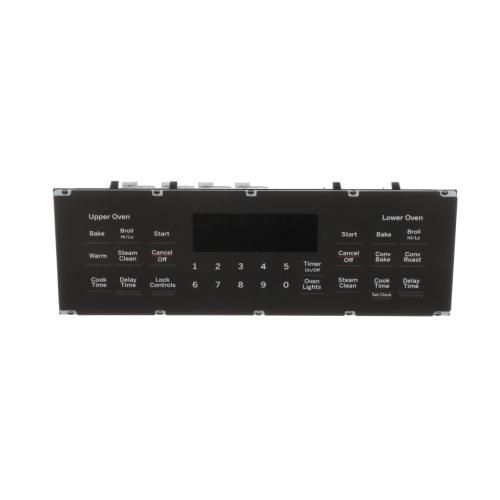
Ge WB27X36306 Oven Control Board & Faceplate Overlay

Special Price $198.75 Regular Price $223.95
In stock
Available Quantity:   16
SKU
WB27X36306

Product Description

The General Electric WB27X36306 Control Board & Faceplate Overlay manages the temperature and cooking capability of the oven accurately. It operates by taking user commands via the faceplate overlay and controlling the internal parts of the oven via the control board.
Manufacturer

https://www.hnkparts.com/media/catalog/product/w/b/wb27x36306-1.jpg

This Part Fits the Following Models (2)

Write Your Own Review
You're reviewing:Ge WB27X36306 Oven Control Board & Faceplate Overlay
Your Rating
Customer Questions
What maintenance is required for the GE WB27X36306 Control Board & Faceplate Overlay?

Keep connectors clean and secure, and wipe the faceplate to remove grease. Confirm buttons respond immediately. Verify heating functions adjust accurately, and cycles progress smoothly during repeated use without skipped commands or delayed responses.

What are common issues with the GE WB27X36306 Control Board & Faceplate Overlay?

  • Touchpad buttons unresponsive.
  • Display panel remaining blank or flickering.
  • Incorrect temperature settings during cooking.
  • Error codes appearing on the screen.

Installation Steps

Step1: Turn off oven power at the breaker before starting installation.

Step2: Remove the control panel cover to access the board area.

Step3: Disconnect wiring harnesses from the old control board carefully.

Step4: Unscrew and detach the old board and faceplate overlay.

Step5: Position new board and faceplate overlay, aligning connectors and mounting points.

Step6: Secure screws, reconnect wiring, and test oven operations.