
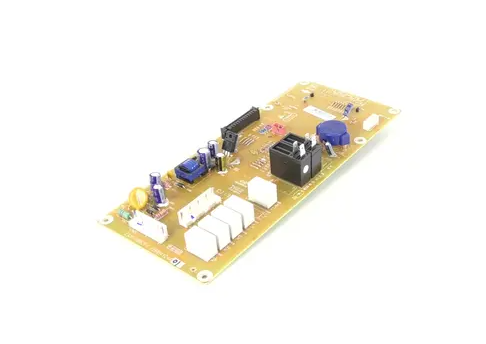
LG EBR84124401 Microwave Main Control Board Assembly

Special Price $106.65 Regular Price $124.95
In stock
Available Quantity:   3
SKU
EBR84124401

Product Description

The LG EBR84124401 Microwave PCB Main Control Board controls the heating time, temperature, and power supply among others. It interacts with the other parts of the microwave to regulate the user interface and the overall performance. Due to the accurate working of the PCB, the chances of errors are reduced to the maximum level, and the user interface is smooth.
Manufacturer

https://www.hnkparts.com/media/catalog/product/e/b/ebr84124401_lge_hnkparts.png

This Part Fits the Following Models (1)

Manufacturer Name: LGE
Product Number: EBR84124401
OEM Part Number: EBR84124401
Product Description: Pcb Assy-Main

Choose the best Home Appliance parts and supplies from HnKParts!

  • Same Day Shipping

  • Best Quality And Best Price

  • Wide Range of Inventory

  • Best Customer Service

Have More Questions or Need Help to Place The Order?
Reach us at (866)723-0907 or [email protected]

Write Your Own Review
You're reviewing:LG EBR84124401 Microwave Main Control Board Assembly
Your Rating
Customer Questions
No Questions
Please, mind that only logged in users can submit questions

Installation Steps

Step 1: Prior to commencing the repair, it should ensure that all required materials are at hand. The replacement LG EBR84124401 PCB ASSY along with appropriate tools such as an anti-static wristband, needle-nose pliers, Phillips screwdrivers, and a soldering iron will be needed.

Step 2: Before proceeding to replace the PCB, it should ensure that you ground yourself by donning the anti-static wristband. This action will assist in avoiding electrocution caused by static electricity.

Step 3: To avert injury and electrical harm, the electrical supply should be disconnected prior to attempting the PCB replacement.

Step 4: The Phillips screwdriver should be employed to remove the four screws that secure the EBR84124401 PCB to the chassis.

Step 5: The soldering iron should be gently utilized to desolder the connectors from the PCB.

Step 6: With the needle-nose pliers, the old PCB should be carefully taken out from the chassis.

Step 7: The new PCB should be carefully positioned and fastened to the chassis using the screws.

Step 8: The soldering iron should be utilized to reconnect the connectors to the new PCB.

Step 9: After all connections have been established, the electrical supply should be reconnected and your repair should be evaluated.

Step 10: If everything functions correctly, your replacement has been accomplished successfully. If issues persist, errors or faulty components should be inspected.

Please remember that these instructions serve as general guidance and should always be used alongside the manufacturer's manual, when available.