
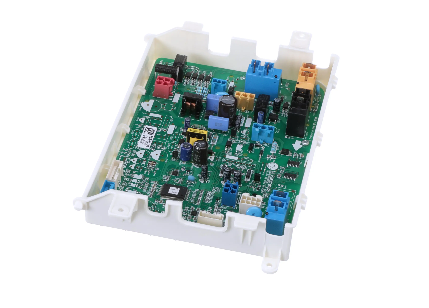
LG EBR76519514 Dryer Main PCB Assembly

Special Price $240.64 Regular Price $278.72
In stock
Available Quantity:   24
SKU
EBR76519514

Product Description

The LG EBR76519514 Dryer Electronic-Control Board (PCB Assembly) receives signals from other sensors such as the temperature and moisture sensors and relays the signals to the dryer’s motor and heating coils. It controls the timing and functioning of other dryer parts like the drying cycles and temperatures among others. The advantages of this control board are better performance, accurate cycle control, energy saving, and durability make the users a better experience while using the washing machines.
Manufacturer

https://www.hnkparts.com/media/catalog/product/e/b/ebr76519514_lge_hnkparts.png

This Part Fits the Following Models (2)

Manufacturer Name: LGE
Product Number: EBR76519514
OEM Part Number: EBR76519514
Product Description: Pcb Assy-Main

Choose the best Home Appliance parts and supplies from HnKParts!

  • Same Day Shipping

  • Best Quality And Best Price

  • Wide Range of Inventory

  • Best Customer Service

Have More Questions or Need Help to Place The Order?
Reach us at (866)723-0907 or [email protected]

Write Your Own Review
You're reviewing:LG EBR76519514 Dryer Main PCB Assembly
Your Rating
Customer Questions
What maintenance is required for the LG EBR76519514 Main PCB Assembly?

Keep the PCB area dry and clear of lint or dust. Avoid using harsh cleaning chemicals. Verify all wire connectors are firmly attached. Proper care supports correct cycle selection, power distribution, and overall dryer operation.

What are common issues with the LG EBR76519514 Main PCB Assembly?

  • Cycles do not complete.
  • Buttons or touchpad unresponsive.
  • Heater or motor does not activate.
  • Error codes are displayed on the control panel.

Installation Steps

Step1: Unplug the dryer to prevent electrical shock before starting.

Step2: Remove the screws securing the dryer’s top or rear control panel.

Step3: Lift the panel to access the main PCB housing.

Step4: Carefully disconnect all wiring connectors from the old PCB.

Step5: Remove the mounting screws and take out the faulty board.

Step6: Install the new board and secure it firmly.

Step7: Reconnect the wires securely, reassemble the panel, restore power, and run a test cycle.