
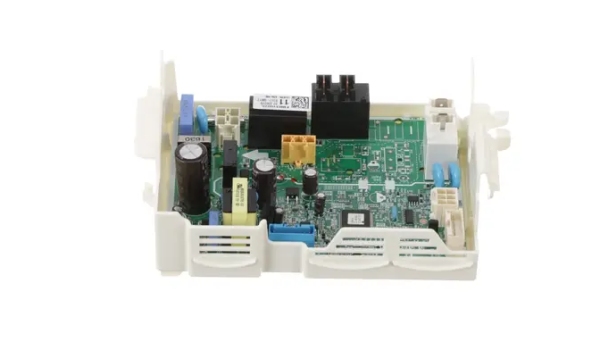
LG EBR31002611 Dryer PCB Assembly

Special Price $163.36 Regular Price $195.95
In stock
Available Quantity:   111
SKU
EBR31002611

Product Description

The LG EBR31002611 Dryer Printed Circuit Board Assembly is to regulate the flow of electricity to control the dryer. This component takes information from the sensors and controls and distributes power to various parts of the dryer. It controls heating elements, motors and timers according to the set cycles. It ensures that dryer gets a uniform drying cycle and the performance of the dryer is well maintained.
Manufacturer

https://www.hnkparts.com/media/catalog/product/e/b/ebr31002611_lge_hnkparts.png
Manufacturer Name: LGE
Product Number: EBR31002611
OEM Part Number: EBR31002611
Product Description: Pcb Assy-Main

Choose the best Home Appliance parts and supplies from HnKParts!

  • Same Day Shipping

  • Best Quality And Best Price

  • Wide Range of Inventory

  • Best Customer Service

Have More Questions or Need Help to Place The Order?
Reach us at (866)723-0907 or [email protected]

Write Your Own Review
You're reviewing:LG EBR31002611 Dryer PCB Assembly
Your Rating
Customer Questions
What maintenance is required for the LG EBR31002611 PCB Assembly?

Disconnect power before any service to prevent electrical shock. Keep the control area free from lint and moisture, as buildup can overheat or corrode circuitry. Ensure wire harnesses are firmly seated and undamaged. Using proper grounding and stable power helps protect electronic components.

What are common issues with the LG EBR31002611 PCB Assembly?

  • Dryer fails to start cycles.
  • Buttons or display unresponsive.
  • Error codes appear unexpectedly.
  • Settings do not save correctly

Installation Steps

Step1: Unplug the dryer from power to ensure safety.

Step2: Open the dryer control panel by removing screws or clips.

Step3: Carefully disconnect all wiring harnesses from the old PCB.

Step4: Remove the old PCB from its mounting bracket.

Step5: Position the PCB onto the bracket and secure it with screws.

Step6: Reconnect all wiring harnesses to the correct terminals.

Step7: Close the control panel and restore power.

Step8: Run a test cycle to confirm proper operation.