
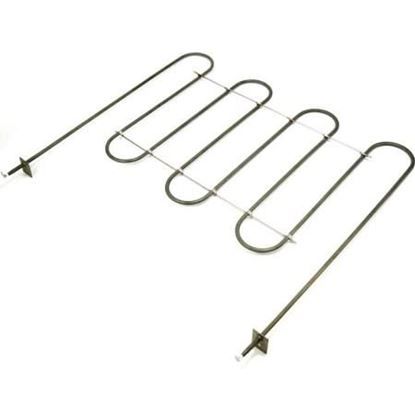
Samsung DG47-00020B Range Bake Heater Element

Special Price $135.32 Regular Price $170.30
In stock
Available Quantity:   125
SKU
DG47-00020B

Product Description

The Samsung DG47-00020B Range Bake Heater Element is designed to provide heat across the entire surface to achieve uniform cooking. It is a heating part that produces heat through the use of electricity and emits it in the form of heat energy. Sited on the bottom of the oven, it has a constant temperature for proper baking of foods. It also ensures even baking and roasting hence enhancing the texture of the food to be cooked.
Manufacturer

https://www.hnkparts.com/media/catalog/product/d/g/dg47-00020b_smg_hnkparts.jpg

This Part Fits the Following Models (95)

Samsung NE59N6650SS/AA-00 Range Samsung NE59R6631SS/AA-00 Free Standing Electric Range Samsung NE59R6631ST/AA-00 Free Standing Electric Range Samsung NE59N6630SG/AA-00 Range Samsung NE59M6850SS/AA-00 Range Samsung NE59N6630SS/AA-00 Range Samsung NE59N6650SG/AA-00 Range Samsung NE59R6631SG/AA-00 Free Standing Electric Range Samsung NE59M6850SG/AA-01 Range Samsung NE59M6850SG/AA-00 Range Samsung NE595R1ABSR/AA-01 Range Samsung NE595R1ABSR/AA-03 Range Samsung NE597N0PBSR/AA-01 Range Samsung NE597N0PBSR/AA-02 Range Samsung NE595R1ABSR/AA-02 Range
Showing 1-15 of 95
Manufacturer Name: Samsung
Product Number: DG47-00020B
OEM Part Number: DG47-00020B
Product Description: Heater-Bake

Choose the best Home Appliance parts and supplies from HnKParts!

  • Same Day Shipping

  • Best Quality And Best Price

  • Wide Range of Inventory

  • Best Customer Service

Have More Questions or Need Help to Place The Order?
Reach us at (866)723-0907 or [email protected]

Write Your Own Review
You're reviewing:Samsung DG47-00020B Range Bake Heater Element
Your Rating
Customer Questions
No Questions

Installation Steps

Step 1: Collect your tools: A Philips screwdriver, an oven mitt, and safety glasses will be required to carry out this DIY task.

Step 2: Deactivate the power: It should ensure that the breakers are turned off and that the knobs on the range are set to the off position.

Step 3: Take out the oven racks: To access the back panel of the oven, the oven racks must first be removed. Starting from the front, a Philips screwdriver should be utilized to detach the two screws found on the side of the oven door.

Step 4: Detach the back panel: After the screws have been removed, the back panel should be lifted off effortlessly. The panel should be set aside in a secure location and it should ensure that none of its screws are misplaced.

Step 5: Locate the defective element: With the back panel removed, the defective element should be found and unscrewed with a Philips screwdriver.

Step 6: Install the new element: The defective element should be substituted with the new one, ensuring it is screwed in firmly.

Step 7: Reattach the panel: The back panel should be repositioned onto the oven and it should be verified that all screws are secured.

Step 8: Verify the new element: The oven should be turned on and it should be confirmed if the element operates correctly.

Step 9: Tidy up: After the successful replacement of the element has been confirmed, the oven racks should be reinstalled and the oven should be switched off. The old element should be safely disposed of and any extra parts should be kept in a secure location.

Please be aware that these instructions are served as general guidance and should always be utilized alongside the manufacturer's manual, if accessible.