
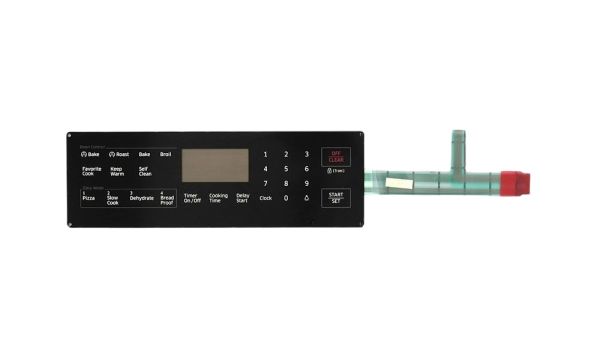
Samsung DG34-00027D Range Switch-Membrane

Special Price $120.86 Regular Price $147.72
In stock
Available Quantity:   50
SKU
DG34-00027D

Product Description

The Samsung DG34-00027D is an authentic replaceable membrane switch manufactured specifically for Samsung products. This essential part operates as the control panel, enabling users to communicate with the appliance through choosing various features and temperatures. Consider the frustration of attempting to prepare a meal using an insensitive or broken membrane switch - buttons are unable to recognize your touch, therefore selections might be erroneous. Upgrade a worn-out membrane switch with the DG34-00027D to bring back complete control and performance to your Samsung range. This guarantees an effortless and user-friendly cooking experience, enabling you to concentrate on producing culinary delights instead of managing an unreliable control panel.

Switch,
Manufacturer
https://www.hnkparts.com/media/catalog/product/d/g/dg34-00027d-90929.jpg
Manufacturer Name: Samsung
Product Number: DG34-00027D
OEM Part Number: DG34-00027D
Product Description: Switch-Membrane

Choose the best Home Appliance parts and supplies from HnKParts!

  • Same Day Shipping

  • Best Quality And Best Price

  • Wide Range of Inventory

  • Best Customer Service

Have More Questions or Need Help to Place The Order?
Reach us at (866)723-0907 or [email protected]

Write Your Own Review
You're reviewing:Samsung DG34-00027D Range Switch-Membrane
Your Rating
Customer Questions
What maintenance is required for the Samsung DG34-00027D Membrane Switch?

Regularly inspect the range switch-membrane for signs of damage or sticky buttons. Clean gently with a soft, damp cloth to avoid residue buildup. Ensure power is off before handling, and check connections periodically to maintain accurarate operation.

What are common issues with the Samsung DG34-00027D Membrane Switch?

  • Range unresponsive or sticking buttons.
  • Inconsistent temperature control.
  • Erratic range settings.
  • Failure to register inputs accurately.

Installation Steps

Step1: Disconnect power supply range to avoid electrical hazards.

Step2: Remove control panel screws carefully.

Step3: Detach old membrane switch connectors gently.

Step4: Align new membrane switch in position.

Step5: Secure it firmly without over-tightening screws.

Step6: Reconnect wiring harness correctly.

Step7: Reassemble control panel components.

Step8: Restore power and test functionality safely.