
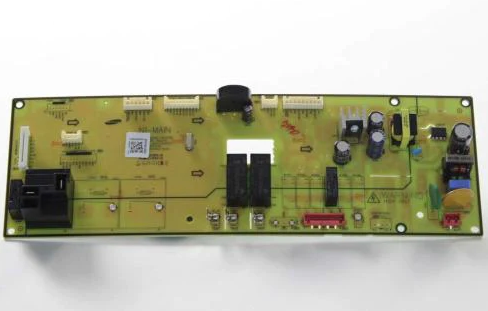
Pcb-Eeprom For Samsung -Part# De94-03595b

Special Price $150.78 Regular Price $227.49
In stock
Available Quantity:   54
SKU
DE94-03595B

Product Description

The Samsung DE94-03595B Range PCB EEPROM is a control board element designed within the control panel of electric or gas ranges, to control cooking features. This module is in charge of the electronic signals that ensure the implementation of programmed commands and assure proper operation of the oven. It works by accumulating vital program data and transferring exact commands to the rest of the electronic components within the appliance, which ensures smooth communication within the appliance.
Manufacturer

https://www.hnkparts.com/media/catalog/product/d/e/de94-03595b_smg_hnkparts.png

This Part Fits the Following Models (3)

Manufacturer Name: Samsung
Product Number: DE94-03595B
OEM Part Number: DE94-03595B
Product Description: Pcb-Eeprom

Choose the best Home Appliance parts and supplies from HnKParts!

  • Same Day Shipping

  • Best Quality And Best Price

  • Wide Range of Inventory

  • Best Customer Service

Have More Questions or Need Help to Place The Order?
Reach us at (866)723-0907 or [email protected]

Write Your Own Review
You're reviewing:Pcb-Eeprom For Samsung -Part# De94-03595b
Your Rating
Customer Questions
What maintenance is required for the Samsung DE94-03595B EEPROM PCB?

The PCB-EEPROM requires careful handling to prevent static discharge and physical damage during installation or servicing. Ensure the appliance is unplugged before accessing the control board. Keep the surrounding area clean and free from dust or moisture. Avoid touching circuit components directly and use proper tools when installing.

What are common issues with the Samsung DE94-03595B EEPROM PCB?

  • Appliance not responding to control inputs or failing to start.
  • Error codes appearing due to corrupted EEPROM data.
  • Inconsistent operation of programmed settings.
  • Failure to retain stored configuration or memory data.

Installation Steps

Step1: Disconnect power supply before starting.

Step2: Remove rear panel of appliance carefully using proper tool.

Step3: Locate and detach old PCB module gently.

Step4: Install new PCB and secure connectors firmly in place.

Step5: Reassemble panel and restore power, then test unit operation.