
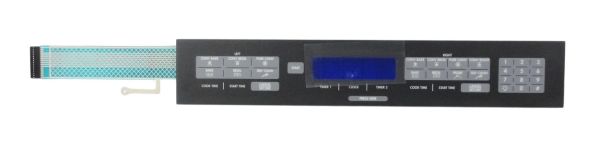
Samsung DE81-08968A Range SVC Membrane

Special Price $278.87 Regular Price $349.95
Out of stock
Available Quantity:   0
SKU
DE81-08968A
✓ This Product Replaces: 100165, 105311

Product Description

The Samsung DE81-08968A Range Service Membrane is an essential component manufactured exclusively for Samsung ranges. It is essential to maintain the touch panel's operation on your range. The internal components of the range then decode these signals, enabling you to control your appliance and choose different settings, including timers, temperatures, and cooking modes. A broken Service membrane could significantly affect your user experience. The touch controls on your range may become unresponsive or behave strangely if the membrane is broken or not functioning properly. The Samsung DE81-08968A Range may make using your range efficiently challenging or even impossible.

Manufacturer

Manufacturer Name: Samsung
Product Number: DE81-08968A
OEM Part Number: DE81-08968A
Product Description: Svc-Membrane

Choose the best Home Appliance parts and supplies from HnKParts!

  • Same Day Shipping

  • Best Quality And Best Price

  • Wide Range of Inventory

  • Best Customer Service

Have More Questions or Need Help to Place The Order?
Reach us at (866)723-0907 or [email protected]

Write Your Own Review
You're reviewing:Samsung DE81-08968A Range SVC Membrane
Your Rating
Customer Questions
What maintenance is required for the Samsung DE81-08968A SVC Membrane?

Maintain the Range membrane by keeping the control panel clean and dry, wiping gently with a soft cloth. Avoid chemicals or excess moisture to prevent damage. Regular inspection can detect wear or unresponsive buttons early. Always disconnect power before handling.

What are common issues with the Samsung DE81-08968A SVC Membrane?

  • Unresponsive or delayed button inputs.
  • Cracked or worn membrane surface.
  • Intermittent control panel operationality.
  • Failure to register touch commands.
  • Peeling or fading button labels.

Installation Steps

Step1: Turn off range power at breaker to avoid electric shock.

Step2: Remove control panel cover and access old membrane.

Step3: Disconnect ribbon cable carefully from control board.

Step4: Peel off damaged membrane from surface.

Step5: Align new membrane and press firmly to secure adhesive.

Step6: Reconnect ribbon cable to control board.

Step7: Reassemble panel and restore power.

Step8: Test all touch operations for proper response.