The store will not work correctly in the case when cookies are disabled.
We collect user information to provide a better user experience and protect the security of our website. By continuing to use our website, you acknowledge the use of cookies.
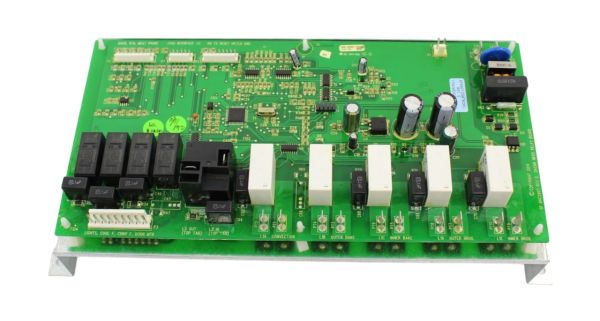
The Samsung DE81-06939A SVC Relay Board ensures that the appliance’s essential components receive the power they need for correct operation. The control board signals the system which then turns on or off relays to control motors, heating elements and other components during various cycles.
Step 1: The appliance should be disconnected from the electrical outlet, and if needed, the screws should be removed from the back panel to reach the board.
Step 2: After access is gained, the SVC-ASSY relay board should be identified and the connections present should be observed.
Step 3: Any wires or cables linked to the board should be detached.
Step 4: The screws that secure the board should be extracted.
Step 5: The old board should be removed and the new Samsung DE81-06939A SVC-ASSY Relay Board should be installed.
Step 6: The board should be firmly positioned and all cables or wires that were initially attached should be reconnected.
Step 7: All connections should be thoroughly inspected to ensure they are securely fastened.
Step 8: The back panel of the appliance should be reattached and it should be reconnected to the electrical outlet.
Step 9: The replacement of your Samsung DE81-06939A SVC-ASSY Relay Board is now finished!
Please remember that these instructions are served as general guidance and should always be utilized alongside the manufacturer's manual, if accessible.