The store will not work correctly in the case when cookies are disabled.
We collect user information to provide a better user experience and protect the security of our website. By continuing to use our website, you acknowledge the use of cookies.
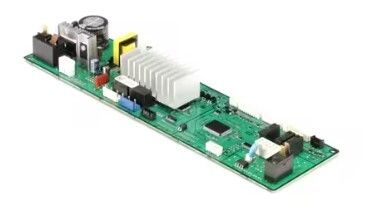
The Samsung DD92-00059G PCB Main Control Board is used to receives signals from sensor buttons and other parts of the dishwasher and controls the flow of water release of detergent, heating, and drainage among other activities in every cycle and controls the motor speed, water temperature, and drying time to achieve the better results for various wash settings. The board also has diagnostics for the system for the accuracy of cleaning while at the same time conserving power.
What maintenance is required for the Samsung DD92-00059G PCB Main Control Board?
Keep the control board dry and free of debris. Wipe gently with a soft cloth. Ensure wiring harnesses are properly connected. Operate wash cycles normally to allow accurate communication between sensors, valves, and motor components.
What are common issues with the Samsung DD92-00059G PCB Main Control Board?
Cycles fail to start.
Pump operates inconsistently.
Display shows errors.
Water inlet fails to respond.
Installation Steps
Step1: Turn off power to the dishwasher at the circuit breaker.
Step2: Open the door and remove screws securing the inner door panel.
Step3: Access the control housing and disconnect wiring from the old board.
Step4: Install the new PCB and reconnect all harnesses firmly.
Step5: Reassemble the door panel, restore power, and run a short cycle test.