
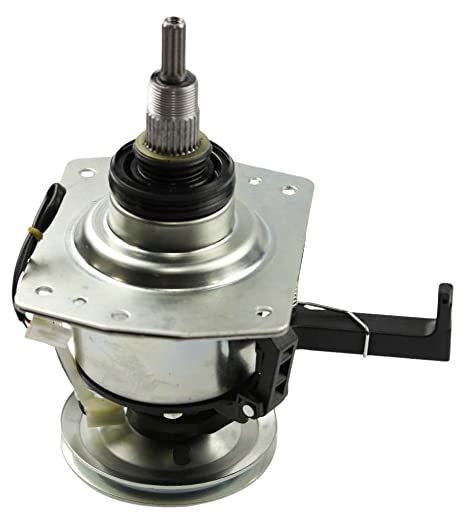
Samsung DC97-16984B Washer Clutch Assembly

Special Price $208.78 Regular Price $273.28
In stock
Available Quantity:   26
SKU
DC97-16984B

Product Description

The Samsung DC97-16984B Washer Clutch Assembly controls the tub’s speed and torque to enable a smooth and efficient operation of the washer. Connecting and disconnecting the drive system to enable the transition between the wash and spin cycles and control improves the washing efficiency sound and vibration and Mechanical efficiency. Built to be sturdy and compatible maintains uniformity in washing prevents harm to internal parts and affects performance.
Manufacturer

https://www.hnkparts.com/media/catalog/product/d/c/dc97-16984b_smg_hnkparts.png
Manufacturer Name: Samsung
Product Number: DC97-16984B
OEM Part Number: DC97-16984B
Product Description: Clutch Assy

Choose the best Home Appliance parts and supplies from HnKParts!

  • Same Day Shipping

  • Best Quality And Best Price

  • Wide Range of Inventory

  • Best Customer Service

Have More Questions or Need Help to Place The Order?
Reach us at (866)723-0907 or [email protected]

Write Your Own Review
You're reviewing:Samsung DC97-16984B Washer Clutch Assembly
Your Rating
Customer Questions
No Questions
Please, mind that only logged in users can submit questions

Installation Steps

Step 1: Begin by disconnecting the power cable from the wall socket and the Samsung DC97-16984B ASSY CLUTCH.

Step 2: A Phillips head screwdriver should be employed to take out the screws situated on the back panel of the ASSY CLUTCH.

Step 3: The back panel should be raised and any debris or dirt that might have built up in the vicinity should be cleared away.

Step 4: The four mounting screws positioned at each corner of the ASSY CLUTCH should be extracted, then the old clutch should be removed.

Step 5: The new Samsung DC97-16984B ASSY CLUTCH should be inserted into its designated spot and fastened with the four mounting screws.

Step 6: The back panel should be reattached and secured using the screws that were previously removed.

Step 7: The power cable should be reconnected and plugged back into the wall socket.

Step 8: The functionality of the new Samsung DC97-16984B ASSY CLUTCH should be verified, and you are finished!

Please be aware that these instructions serve as general guidance and should always be utilized alongside the manufacturer's manual, if available.